
Pismo data platform – HTTP integration guide (beta)
Use this guide to integrate with the Pismo data platform using HTTP connectivity. It covers:
- How the integration works
- Architecture and encryption process
- Connectivity and authentication
- Security standards
- How to request the integration via ticket
How HTTP connectivity works
Pismo’s event hub sends real-time events from the Pismo platform to your systems. Events are delivered through HTTPS using Visa-compliant encryption standards and JSON Web Tokens (JWTs) for authentication. This ensures data protection even if requests are intercepted.
To configure HTTP connectivity, provide the following information:
-
HTTPS endpoint where the Pismo event hub sends events
-
Public certificate encoded in Base64
-
Certificate identifier (optional)
-
Maximum transactions per second (TPS)
When the integration is configured:
-
Your certificate is stored securely.
-
The certificate identifier appears as the key ID (KID) in the
enc_secretheader information. -
A KID is generated for JWT authentication.
-
Your public certificate encrypts the symmetric key used for event decryption.
-
Each event generates one HTTP POST request to your endpoint.
Architecture
Fanout behavior
The Pismo event hub uses a one-to-one delivery model.
-
Each event generates one HTTP request.
-
Multiple events generate multiple requests.
-
Request headers remain consistent across requests.
Encryption flow
The integration uses the following encryption process:
-
The event payload (
enc_data) encrypted with a symmetric key generated at runtime using AES-GCM (256). -
The symmetric key (
enc_secret) encrypted with your public certificate using RSA-OAEP-SHA256. -
Both
enc_dataandenc_secretare included in the request body:
{
 "enc_data": "<encrypted_jwe_payload>",
 "enc_secret": "<encrypted_jwe_key>"
}
Connectivity and authentication
HTTP endpoint
Provide the HTTPS endpoint that receives event requests. The Pismo event hub sends HTTPS POST requests to this endpoint.
JWT Authentication
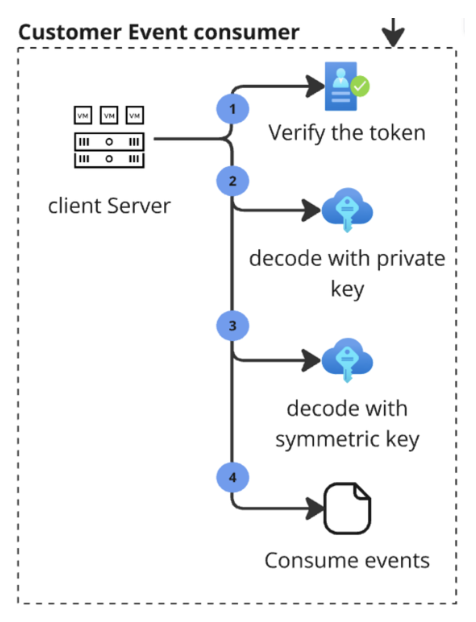
Each request includes a JWT in the authorization header. The JWT is signed by Pismo using RS256 (RSA SHA-256). Verify the JWT before processing the request.
Verify the JWT
- Parse the JWT using a trusted library. Supported languages include Go, Python, Node.js, Java, and .NET.
- Retrieve the KID from the JWT header.
- Check whether you already have the corresponding public key cached.
- If the key is not cached, retrieve it from the appropriate public-key endpoint:
-
Test environment: Pismo test certificates endpoint
-
Production environment: Pismo production certificates endpoint
-
- Verify the JWT signature with the public key.
Important:
-
Cache public keys and refresh them based on the
cache-control) header value (max-age). -
Do not call the public keys endpoint for every request. The endpoint is rate limited to five requests per second.
-
For more information, refer to the Verifying webhook requests guide.
Security standards
HTTP connectivity uses Visa JWE and JWS standards for encryption and signing. JWT authentication helps verify request authenticity and maintain payload integrity. For additional information, see the following resources:
- Visa Encryption Guide (refer to the Creating JWE > Using RSA PKI sections)
- Visa Developer Center registration
- Visa Developer Center sign-in
Request the integration
Submit a Pismo support ticket to request HTTP connectivity. Include all required information in the initial request to help avoid delays.
Ticket Template
Subject:
Request for HTTP event hub integration
Description:
Request HTTP connectivity to receive Pismo events. Include the following information:
- Organization ID
- Environment (PROD/STAGE)
- HTTPS Endpoint URL
- Example: https://yourdomain.com/events
- Public Certificate
- Encode your PEM certificate in Base64.
- Certificate Identifier
- Provide a unique identifier such as
my-cert-2025. - Used by Pismo for internal control and by you to identify which private key to use.
- Provide a unique identifier such as
- Maximum TPS (Transactions per Second)
- Provide the agreed limit for your endpoint.
Decrypt events
Use the following procedure to decrypt an event payload.
Step 1: Decrypt enc_secret
enc_secretDecrypt enc_secret with your private key using:
- Key Management: RSA-OAEP-SHA256
- Content Encryption: AES-GCM (256)
The result is a UUID.
Step 2: Generate SHA-256 hash
Generate a SHA-256 hash from the UUID. The hash becomes the key used to decrypt enc_data.
Step 3: Decrypt enc_data
enc_dataDecrypt enc_data using:
- Key Management: AES-GCM Key Wrap (256)
- Content Encryption: AES-GCM (256)
The output is the original event payload.
The following workflow shows the overall process for verifying, decrypting, and consuming event payloads received from the Pismo event hub.
Updated 3 months ago