
Interest-bearing accounts
Banks and financial institutions offer various types of accounts that can earn interest, including savings accounts and deposit accounts. These accounts are typically used for short-term savings, emergency funds, specific goals like travel or major purchases, or as part of a diversified investment strategy. They provide a safer alternative to riskier investment options and offer a convenient solution for saving money while accruing interest. These accounts can often be created as sub-accounts by account holders through their banking apps.
The Pismo platform offers an API that supports a wide range of interest-bearing accounts, including savings and deposit accounts, all capable of performing daily interest calculations and payouts as well as on a monthly, quarterly, semi-annual, annual basis, or at its maturity.
Pismo offers the following bank account products, each with its own specific rules and benefits:
-
Savings account product: These accounts can be created as sub-accounts in banking apps, allowing for easy deposit and withdrawal of funds.
-
Deposit product: Also known as Certificates of Deposit (CDs), these accounts have a preset maturity date. Customers must leave their money in the account for an agreed-upon term. Early withdrawals may incur fees, and these accounts often have a minimum deposit requirement, a maximum balance limit, and a cooling-off period. They offer various rule possibilities, making them versatile for clients looking for different interest calculation options.
The return, interest rate, and other features of these accounts depend on the account terms and conditions and can vary based on the account type and the financial institution. They might require a minimum deposit or balance, have restrictions on withdrawals and transfers, and the terms can change over time.
Deposit accounts are particularly popular on the Pismo platform due to their ability to support multiple rule possibilities, while savings accounts remain more basic. The interest-bearing accounts solution from Pismo is notable for its robust capability to process large volumes of daily operations, fully customizable fee and interest calculations, and the generation of legal reports.
This guide provides information on the available options to set up interest-bearing accounts on the Pismo platform, including common parameters, outputs, and examples.
Interest-bearing accounts on the Pismo platform
Banking by Pismo
If you maintain accounts on the Pismo platform as part of its core banking solution, you have seamless access to the products and solutions offered by Pismo and are uniquely set up to take advantage of their flexible configurations and high-capacity processing.
In this case, work with the Pismo representative to set up interest-bearing accounts. Note that you can also set up the following steps in Pismo Control Center:
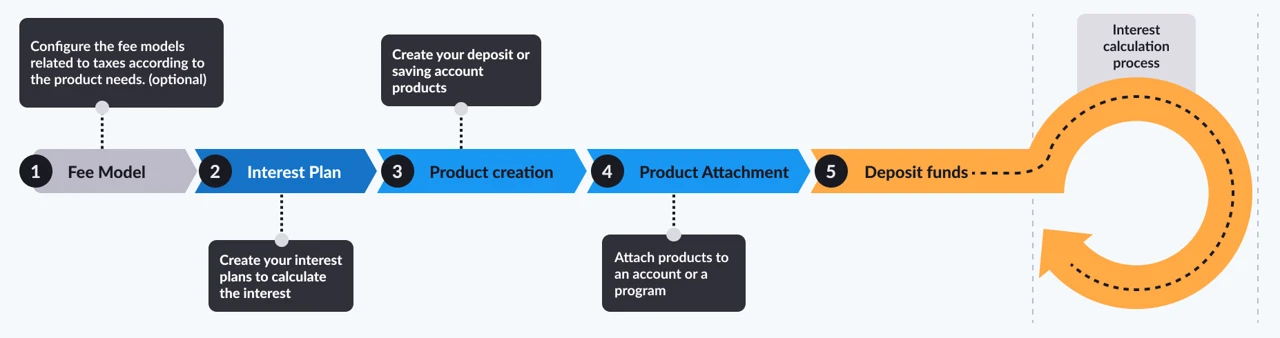
Figure 1: Pismo banking workflow
NoteUse Open deposit account if you want to streamline three operations in one: specify a transaction banking account (
external_account_id), attach product to it (usingproduct_id), and set renewal instructions (usingrenewal_term). This ensures atomic account creation and configuration.
- If applicable, set up the fee model in the Pismo platform to withhold any taxes or operational fees. Refer to Fee models for how to set this up in Control Center.
- Configure a flexible plan to accrue interest according to your needs. To set this up in Control Center, refer to Interest plans.
- Create a product (Savings or Deposit product) in the Pismo platform. Refer to Deposit products if you want to configure it using Control Center.
- Attach the product you created to specific accounts or all accounts in a program. Note that you cannot attach more than one product to the same program or account.
NoteYou can optionally attach a deposit or savings account to a product using a past effective date, with all product lifecycle events and calculations based on that historical start date.
- Define a renewal term using Attach deposit to account, to be applied at maturity to the next deposit cycle. To update a renewal term, use Update deposit account attachment overrides.
- Once complete, events are generated to notify you of the interest to be posted. For more information, refer to Output events.
Minimum amount for interest calculation
- You have the option to specify a minimum amount used for interest calculation, either at the program level or for a specific account ID. Specify a value in the
min_amountfield of Create deposit product or Create savings account product. If you choose not to set a minimum, interest is calculated on any amount.
Override account-level configurations
You can override account-level configurations inherited from the product, this includes:
- Maturity instructions
- Renewal term
- Penalties
- Payout account
Refer to Update deposit account attachment for rule overrides (overrides, only for deposit accounts) and Update payout account for deposit account (payout_account) for savings and deposit account overrides.
Maturity notices
Supports configuring up to three maturity notices for a deposit product. When a configured notice date is reached, Pismo platform sends an event indicating that the account is approaching maturity. For example, notices can be set for 30, 14, and 7 days before maturity. The configuration is optional and can be created or updated after product creation. Refer to notices in Create deposit product.
Funding duration
When you create a deposit product without specifying a value in funding_duration, a newly created deposit account begins in a BLOCKED status, and it always accepts cash in while cash out remains restricted until the funding conditions are met. To prevent both cash in and cash out, you must provide a funding duration; once that period is reached, the status moves from BLOCKED to NO OPERATIONS.
Pismo integration with other banking systems
If you maintain accounts in a different core banking system outside of Pismo, you can still utilize the Pismo platform to offer interest-bearing accounts to your clients and to process accrual calculations. In addition to the flexibility and high capacity of Pismo platform processing, this solution offers legal reports.
In this case, work with the Pismo representative to set up interest-bearing accounts.
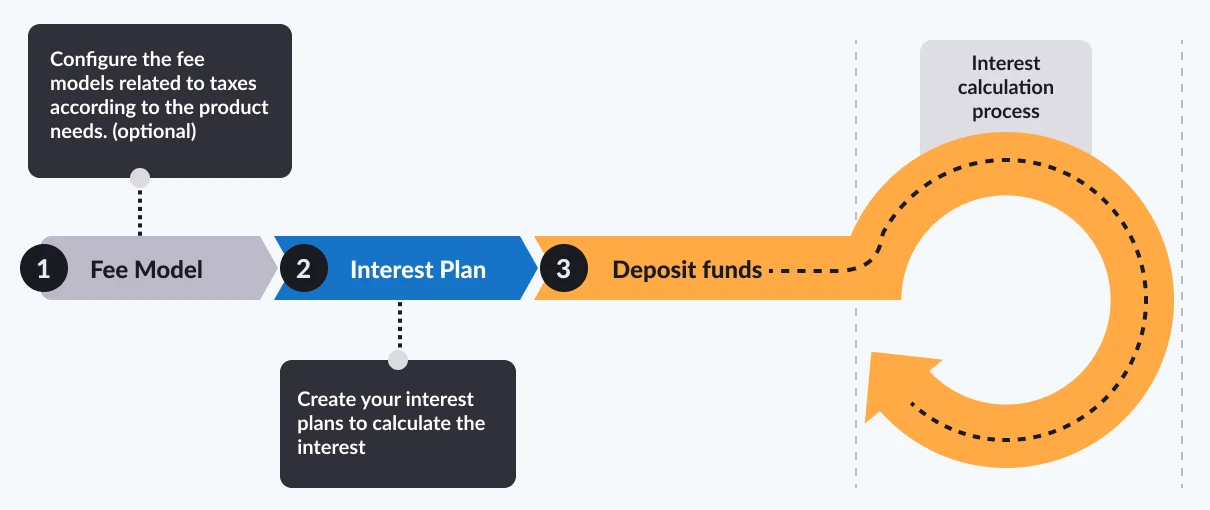
Figure 2: Pismo integration with other banking systems
- If applicable, set up the fee model in the Pismo platform to withhold any taxes or operational fees.
- Configure a flexible plan to accrue interest according to your needs.
- Configure integration with your core banking system.
- Once complete, events are generated to notify you of the interest to be posted. For more information, refer to Output events.
Penalties for deposit products
You can set different types for deposit accounts. For details, refer to Penalties for CD accounts.
Output events
The Pismo platform generates events such as Interest accrual succeeded and Interest capitalization succeeded.
Interest capitalization ledger entries
During interest capitalization, the Pismo platform records a credit entry in the deposit account and, when an interest payout account is configured, creates a corresponding debit entry to transfer the amount. This ensures a complete accounting trail and improves financial tracking.
Regulatory reports
Contact your Pismo representative for the regulatory reports available in your region.
Examples
Scenario 1
For example, your principal amount is 10,000, the floating interest rate is DI (10.65% for the entire period), the index rate is 103%, the accrual rate is daily, and the payout frequency is daily. The Pismo platform uses your account balance to calculate the daily yield after the cut‑off window and credits the amount to your account on the next business day (D+1), according to your configured settings.
If you make no deposits or withdrawals, your account accrues the following amounts:
• On day 2, the credited amount is 4.13.
• On day 3, the credited amount is 4.13.
• On day 4, the credited amount is 4.14, and so on.
Scenario 2
In this example, your principal amount is 10,000, the fixed interest rate is 6.17%, the accrual rate is monthly, and the payout frequency is monthly. The platform calculates your yield based on your account balance and credits it to your account each month.
If you make no deposits or withdrawals, your account accrues the following amounts:
• For month 2, the credited amount is 50.02.
• For month 3, the credited amount is 50.27.
• For month 4, the credited amount is 50.51, and so on.
Common configuration parameters
The following parameters are common for setting up interest-bearing accounts. Refer to Create interest plan for detailed field descriptions.
| Parameter | Possible values |
|---|---|
| Accrual basis dictates the total days in a year to be considered when calculating the daily rate. |
|
| Accrual frequency defines when the accrual process happens. |
|
| Capitalization frequency defines when the interest payment happens. |
|
| Capitalization mode allows capitalized interest to be directed either back into the deposit as reinvestment or to a designated external account as a cash‑out. | Two options are available:
|
| Interest calculation supports using the end‑of‑day account balance as the basis for computing interest. You can specify which balance is used for interest calculation. | The Pismo platform calculates interest using a deposit‑based method that evaluates daily deposits and withdrawals and computes interest from the change in the account’s balance each day. Refer to |
| Interest type indicates if the accrual is based on simple or compound interest calculation. |
|
| Operation type indicates the type of operations for your interest plan. | There are two operation types:
|
| Tax withholding specifies the point in time when tax withholding takes effect. If omitted, no tax is withheld. | When your
|
| Interest rates determine how much interest the account holder earns on their deposits. |
|
| Interest by tiers applies different interest rates to specific balance ranges within the same interest plan. |
|
| Interest threshold establishes optional cap (upper limit) and floor (lower limit) boundaries for the applied interest rate. Each boundary includes a threshold representing the maximum or minimum allowable rate and an effective rate applied when the corresponding limit is reached. |
|
Interest base model determines how interest is calculated. The default is CLOSING-BALANCE. |
|
| Fee is any fee or tax that you want to apply. | You can configure and attach any fee model. For example, you can configure and apply national taxes or custom operational fees. |
Updated 24 days ago