
Divisions
Divisions model an organization’s operational structure, mapping regions, countries, branches, and business units into a single hierarchy so clients can scope configuration, control product availability, and inherit operational settings.
Divisions are assigned to accounts and serve as the primary reference for account‑level behavior, especially time‑related settings. So assigning accounts to divisions ensures posting, settlement, and business‑date calculations follow the correct local time on global, 24/7 platforms.
Beyond timezones, divisions govern operational rules such as cycle closing and posting windows, allowing different parts of the organization to run distinct schedules that reflect local market practices or regulatory requirements. By binding program sets to divisions, you can also restrict which products can be created in each region or business unit, enforcing product availability and operational boundaries.
Note
Cycle‑closing rules are not configured at the account level, but can be configured at program, organization, or division level.
When to use divisions
You use divisions to:
- Represent geographic regions, business units, or hybrid models
- Enforce product availability per region or business line
- Define local operational schedules such as cycle closing and posting windows
- Link to Holiday calendar for holiday‑aware processing
Core concepts
Refer to these core concepts when creating divisions.
| Concept | Description |
|---|---|
| Hierarchy | Divisions form a parent → child tree. |
| Inheritance | Children inherit parent settings unless explicitly overridden. |
| Scope | Divisions scope timezones, cycle rules, calendars, and program bindings. |
| Program binding | A division is bound to a single program set. Updating the binding replaces the previous set. Programs refer to financial product offerings, such as credit and debit. For details about programs, refer to Core objects and Program types. |
| Holiday calendar | Holiday calendars are separate entities for calendars and holidays. Divisions can link to them to inherit holiday and working-day rules. Refer to Create holiday calendar for details. |
Note
- The Pismo platform traverses up the division tree to resolve missing values such as timezone.
- If no value is found anywhere in the hierarchy, the Pismo platform defaults to UTC.
API
Use these endpoints to manage divisions.
| Endpoint | Description |
|---|---|
| Create division | Defines a division’s geographic scope and sets its code, hierarchy ID, level ID, or links it to an administrative division. |
| Update division | Modifies an existing division’s configuration, for example its administrative division, timezone, or program. |
| Get division | Gets the configuration for a specific division. |
| List division | Returns all divisions and their configurations. |
Modeling patterns and best practices
Divisions define an organization’s operational structure, while Holiday calendar captures calendar behavior like holidays and working days, linking a division to an administrative division lets it inherit those calendar rules. In practice, organizations model divisions to suit their needs, many banks mirror geography (Global → Region → Country → Branch) to manage local regulations, holidays, and time zones, while others use business‑line segmentation (Retail, Corporate, Treasury) to separate product sets and operational rules.
A common and recommended approach is a hybrid model that combines geography and business lines. For example, create country-level divisions and then separate retail and corporate subdivisions within each country. This lets you apply regulatory controls and business policies with greater precision.
Less commonly, divisions are organized around processing windows or time zones when timing is the primary concern.
Here is a sample division model for your reference.
| Model | Structure / Notes |
|---|---|
| Geographic | Global → Region → Country → Branch |
| Business unit | Organization → Business Unit (Retail, Corporate) → Team/Branch |
| Hybrid (recommended) | Global → Region → Country → (Retail / Corporate) → Branch |
| Time‑based (special cases) | Use only when processing windows or timezones are the primary concern |
Best practices
- Keep hierarchy as shallow as practical.
- Define global defaults at high levels and override only when necessary.
- Document each division’s purpose and program bindings.
- Test posting, settlement, cycle closing, and holiday handling across divisions and linked calendars.
Operational rules and governance
Program binding
Use the Create or the Update division endpoint to bind a program set. Any subsequent calls to this endpoint replaces the division’s previous program set, use bindings to restrict product creation and enforce product availability.
State and change management
Treat division updates as configuration changes and maintain audit logs. Plan safe rollouts and test changes in staging before production.
Monitoring and alerts
Track changes to division program sets and calendar links. Alert on unexpected program updates or calendar mismatches.
Example division tree
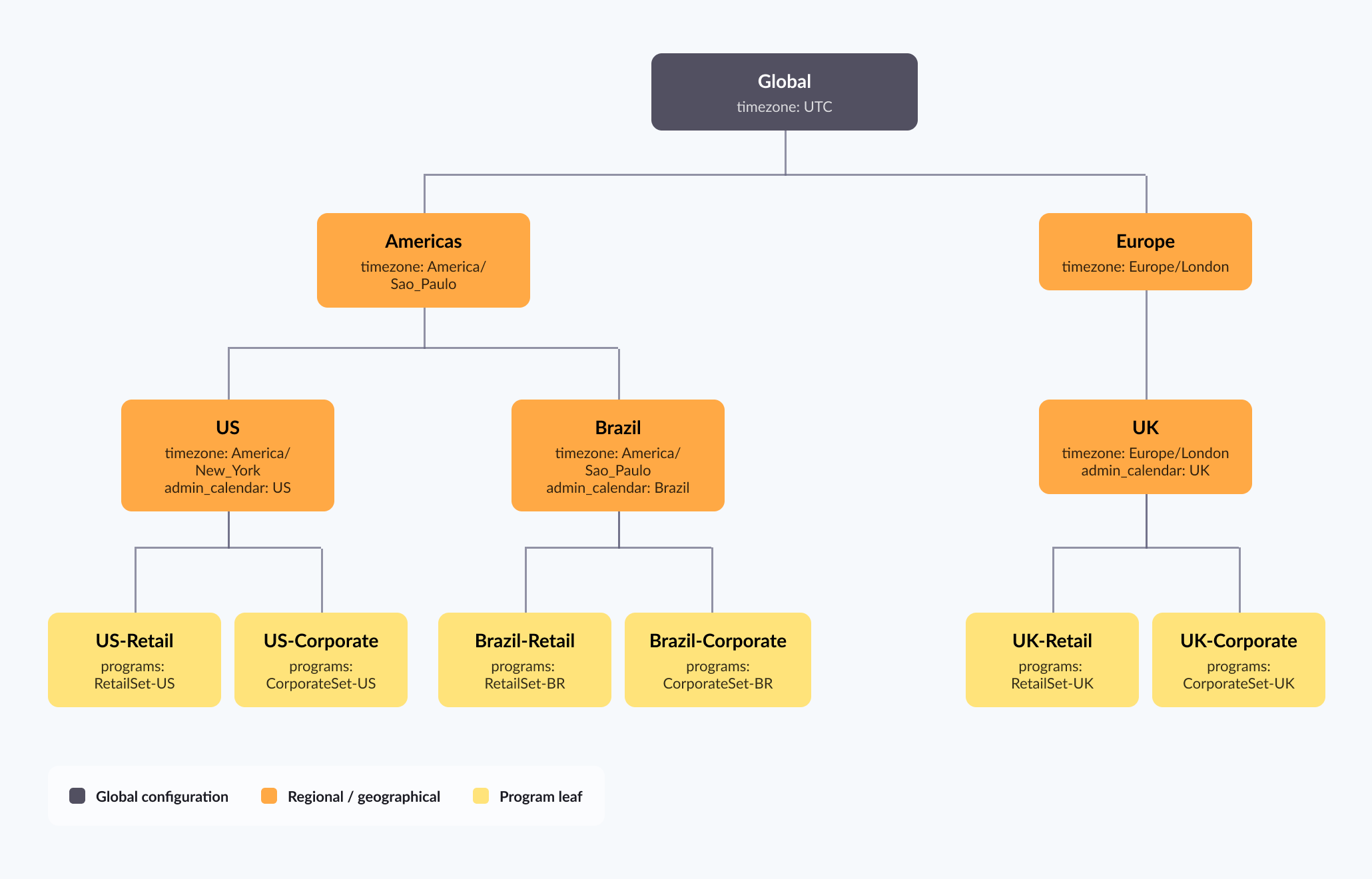
Figure 1: Example division tree
Example API snippets
Create a division
Use Create division to create and define a division and its hierarchy.
{
  "division_id": "<your_division_id>",
  "division_code": "my-division",
  "level_id": "<your_level_id>",
  "parent_code": "my-parent-division",
  "name": "NORAM",
  "description": "North American regional division"
}
Update division timezone and administrative division
Update an existing division by specifying a division code in the URL path. This is a sample request for updating time zone and administrative division.
{
  "timezone": "America/New_York",
  "administrative_division_id": "admin-na-01"
}
Get division
Use Get division to return a list of division configurations.
{
  "hierarchy_id": "9bb95e15-c0e6-4c84-b644-350c76a83358",
  "level_id": "7d574f66-ebd0-4b83-85a1-98ce7569e5c3",
  "name": "NORAM",
  "division_id": "6f8a456a-8b1a-4022-a2f8-7612595330b5",
  "administrative_division_id": 13,
  "parent_code": "my-parent-division",
  "description": "North American regional division",
  "program_ids": [
    111,
    222,
    333
  ],
  "timezone": "Pacific Standard Time",
  "schema": {
    "$schema": "https://json-schema.org/draft/2020-12/schema",
    "$id": "https://example.com/product.schema.json",
    "title": "Product",
    "description": "A product from Acme's catalog",
    "type": "object",
    "properties": {
      "product_id": {
        "description": "Product ID",
        "type": "integer",
        "format": "int64",
        "example": 1234,
        "x-readme-ref-name": "ProductID"
      }
    },
    "required": [
      "product_id"
    ]
  }
}
Quick checklist before rollout
- Define division purpose and intended model: geographic, business, or hybrid.
- Map parent/child relationships and keep depth minimal.
- Set top‑level defaults such as timezone and cycle rules.
- Bind program sets and document them.
- Link administrative calendars where applicable.
- Test posting, settlement, cycle closing, and holiday handling.
- Maintain audit logs and monitoring for division changes.
Updated about 1 month ago