
Single ledger entries and book transfers
Use the Post payment API to create single ledger entries and book transfers.
A single ledger entry applies a one-sided posting to an account, either adding funds with a credit or removing funds with a debit. A book transfer moves funds between two accounts by applying both a debit and a credit within the same request.
These patterns define how financial movements are recorded in the ledger and how account balances are updated.
Business benefits
Single ledger entries and book transfers provide a consistent way to represent financial activity across accounts. Using these patterns allows you to:
- Maintain a clear and auditable ledger of all financial movements
- Apply balance updates using standardized debit and credit logic
- Move funds between accounts while preserving transactional integrity
- Control how transactions behave using processing codes and validation rules
These capabilities ensure that all balance updates follow a predictable and traceable model aligned with banking principles.
Single ledger entries and book transfers are built on the Pismo banking ledger model, where all financial activity is recorded as structured debit and credit postings. These patterns are not standalone operations. They directly leverage how the Pismo platform processes, validates, and records transactions. These patterns correspond to the core banking model in the following ways:
- All balance changes are processed through the centralized ledger engine, ensuring that every posting follows the same accounting logic and system rules.
- Processing codes integrate with the transaction configuration model, allowing each operation to map to a predefined business meaning and behavior within the core banking system.
- Validation rules evaluate transactions against account status and ledger constraints before applying them.
- Each request is validated against the calendar controls. It ensures that they are evaluated against business date configuration before they are completely processed.
- Paired debit and credit postings (book transfers) are executed atomically, ensuring that fund movements between accounts are consistent and synchronized within the ledger.
- Cancellation flows generate reversal postings instead of modifying historical data, preserving a complete and auditable transaction history.
This integration ensures that all financial movements follow the same underlying principles used across the Pismo platform.
How it works
The Post payment API applies ledger postings based on the request structure. A request can create a single posting or a paired posting, depending on the operation.
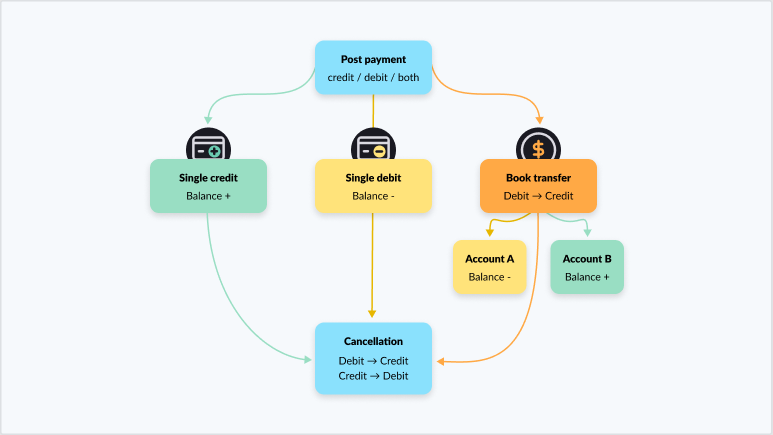
The diagram shows how Post payment operations affect account balances based on the transaction type. A request can result in a single credit, a single debit, or a book transfer.
Single credit
Applies a credit to one account, increasing its balance. Use this operation to represent incoming funds.
Single debit
Applies a debit to one account, decreasing its balance. Use this operation to represent outgoing funds.
Book transfer
Moves funds between two accounts by applying both a debit and a credit in the same request:
- Debits the source account (balance decreases)
- Credits the destination account (balance increases)
This operation redistributes funds between accounts.
The flow also supports cancellation. When you cancel a transaction, the Pismo platform applies opposite postings to reverse the original debit and credit, preserving a complete record of the transaction history.
Transaction patterns
Single ledger entry
A single ledger entry is a one-sided posting applied to a single account. The request contains either a credit object or a debit object. Use credit to add funds to the account. Use debit to remove funds from the account.
Book transfer
A book transfer moves funds between two accounts. The request includes both a debit and a credit object. The Pismo platform processes both postings together, debiting the source account and crediting the destination account in the same transaction.
Recommended transaction patterns by objective
| Objective | Recommended pattern |
|---|---|
| Add funds to an account | Single ledger entry with credit |
| Remove funds from an account | Single ledger entry with debit (optionally include debit.earmark_id) |
| Move funds between accounts | Book transfer with debit and credit |
| Move funds with override behavior (when permitted) | Book transfer with debit and credit, using force_post: true (do not include earmark_id on the debit) |
Rules and triggers
To execute a Post payment request correctly, you must consider how the Pismo platform validates and processes transactions.
Processing codes
Each request requires a processing_code. This value defines the type of financial operation and determines how the posting effects balances. Refer to Create processing code for more information.
If the debit or credit request does not include a processing code, the Pismo platform uses the standard processing code.
Calendar and business date
All transactions are validated against the Pismo calendar configuration. Business date rules determine when a transaction is applied and how it affects balances. Refer to the business_date field of Post payment for information on how to configure business dates. For information on configuring dated transactions, refer to Business-dated transactions and Back-value-dated transactions.
You must ensure that the requested operation aligns with the configured business calendar and processing rules.
Validation rules
The Pismo platform supports validation logic through the validation_rules object, which provides granular control over how transactions are processed.
Validation rules allow you to control behaviors such as:
- Account status validation
- Ledger constraints
These rules define whether a transaction is accepted or rejected based on account configuration and system state.
Validation rules example
Use the validation_rules object to control how the Pismo platform validates and processes a transaction.
Validation rules allow you to selectively enable or override specific validation checks instead of applying a full override with force_post.
Do not use
force_postwithvalidation_rules. These parameters are mutually exclusive and result in an error if used together. Usevalidation_ruleswhen you need granular control over validation behavior, such as selectively overriding ledger or account status checks.
This example shows a book transfer with validation behavior explicitly defined:
POST /payments

{
    "credit": {
        "external_account_id": "acct-destination-id"
    },
    "debit": {
        "external_account_id": "acct-source-id"
    },
    "amount": {
        "value": 1,
        "currency": "{{currency.code}}"
    },
    "soft_descriptor": "Transfer operation",
    "tracking_id": "idempotency-id",
    "validation_rules": {
        "LEDGER": {
            "force": true
        },
        "ACCOUNT_STATUS": {
            "override": true
        }
    }
}
In this example, the Pismo platform applies a standard book transfer while modifying validation behavior by skipping account status checks and enforcing ledger constraints.
Use validation_rules when you need granular control over how the Pismo platform evaluates a transaction. This approach allows you to adjust specific validation checks without overriding the entire validation model.
Required fields
Each post payment request requires:
- An account identifier. Depending on the endpoint, use
external_account_idoraccount_idto identify the target account. Refer to Post payment and Post payment (Pismo account ID) for more information. - A
tracking_idto uniquely identify the transaction. It is also used for balance reconciliation and cancellation. - The amount that determines the value to be processed in this operation.
These fields ensure that the Pismo platform can process, track, and reconcile each transaction correctly.
Post payment validation checklist
Before sending a Post payment request:
-
Confirm that each leg uses the correct
external_account_id(debit and credit). -
If you want to use a non-standard
processing_code, confirm that it is valid and mapped to the intended operation type. -
If you use
debit.earmark_id, confirm that the earmark exists and is the intended balance source. -
If you set
force_post: true, do the following:-
Confirm that the account status allows force operations.
-
Don’t use force with earmark debit (not supported per reference).
-
Post a credit
Submit a request that contains only a credit object. A credit is the aggregate of the remaining balance from all the credit transactions that have been posted to the account. Refer to Account balance definitions for transaction banking for more information.
POST /payments

{
"tracking_id": "txn-001",
"credit": {
"external_account_id": "acct-123",
"processing_code": "CREDIT_CODE",
"amount": 100.00,
"currency": "USD",
"description": "Cash-in"
}
}
In this example, the Pismo platform posts a credit and increases the account balance by $100.
Post a debit
Submit a request that contains only a debit object. A debit is the total balance of debit transactions recorded for the account. Any value greater than zero indicates the use of a credit limit. Refer to Account balance definitions for transaction banking for more information.
POST /payments

{
"tracking_id": "txn-002",
"debit": {
"external_account_id": "acct-123",
"processing_code": "DEBIT_CODE",
"amount": 50.00,
"currency": "USD",
"description": "ATM withdrawal"
}
}
In this example, the Pismo platform posts a debit and decreases the account balance by $50.
Debit from an earmark
Include earmark_id to debit from a reserved balance. An earmark is an amount that has been set aside for future use but has not yet been debited from the account. Earmarking reduces the available balance and increments the earmarked balance correspondingly. Despite being subtracted from the available balance, it continues to form part of the book balance. Refer to Account balance definitions for transaction banking for more information.
{
"tracking_id": "txn-003",
"debit": {
"external_account_id": "acct-123",
"processing_code": "DEBIT_CODE",
"amount": 25.00,
"currency": "USD",
"earmark_id": "earmark-001"
}
}
In this example, the Pismo platform deducts $25 from the earmarked balance instead of the available balance.
Execute a book transfer
Submit a request that contains both debit and credit objects.
POST /payments

{
"tracking_id": "txn-004",
"debit": {
"external_account_id": "acct-source",
"processing_code": "TRANSFER_DEBIT",
"amount": 100.00,
"currency": "USD"
},
"credit": {
"external_account_id": "acct-destination",
"processing_code": "TRANSFER_CREDIT",
"amount": 100.00,
"currency": "USD"
}
}
The Pismo platform debits the source account and credits the destination account in a single operation.
Force a book transfer
Set force_post to true to override validation rules.
{
"tracking_id": "txn-006",
"force_post": true,
"debit": {
"external_account_id": "acct-source",
"processing_code": "TRANSFER_DEBIT",
"amount": 200.00
},
"credit": {
"external_account_id": "acct-destination",
"processing_code": "TRANSFER_CREDIT",
"amount": 200.00
}
}
The Pismo platform attempts the transfer even if standard constraints prevent it.
Cancel a payment
The Cancel payment endpoint supports multiple cancellation behaviors based on the business date. By default, the Pismo platform reverses a payment using the original business date of the transaction. You can also cancel a payment at the current business date without modifying balances from previous dates.
Use the cancellation_method object to select the cancellation behavior.
Cancellation methods
The cancellation_method object defines how the Pismo platform applies reversal postings.
INSTANTapplies the reversal at the current business date. This method updates current balances without modifying prior dates. Use this method when you need to reverse a transaction regardless of its original posting date. If you do not provide a value, the Pismo platform defaults toINSTANT.ORIGINAL_DATESapplies the reversal using the original business date and payment timestamp. This method restores balances as if the original transaction had not occurred. Use this method when you need historical consistency across ledger balances.
For future business dated payments, the payment is cancelled on the future business date if the current date is before the original business_date. The business date of the cancellation follows the same rules as the Post payment endpoint.
This is an example of an INSTANT cancellation.
POST /payments/cancel

{
"original_tracking_id": "txn-004",
"tracking_id": "txn-004-cancel",
"cancellation_method": "INSTANT"
}
Updated 4 months ago