
Fee models
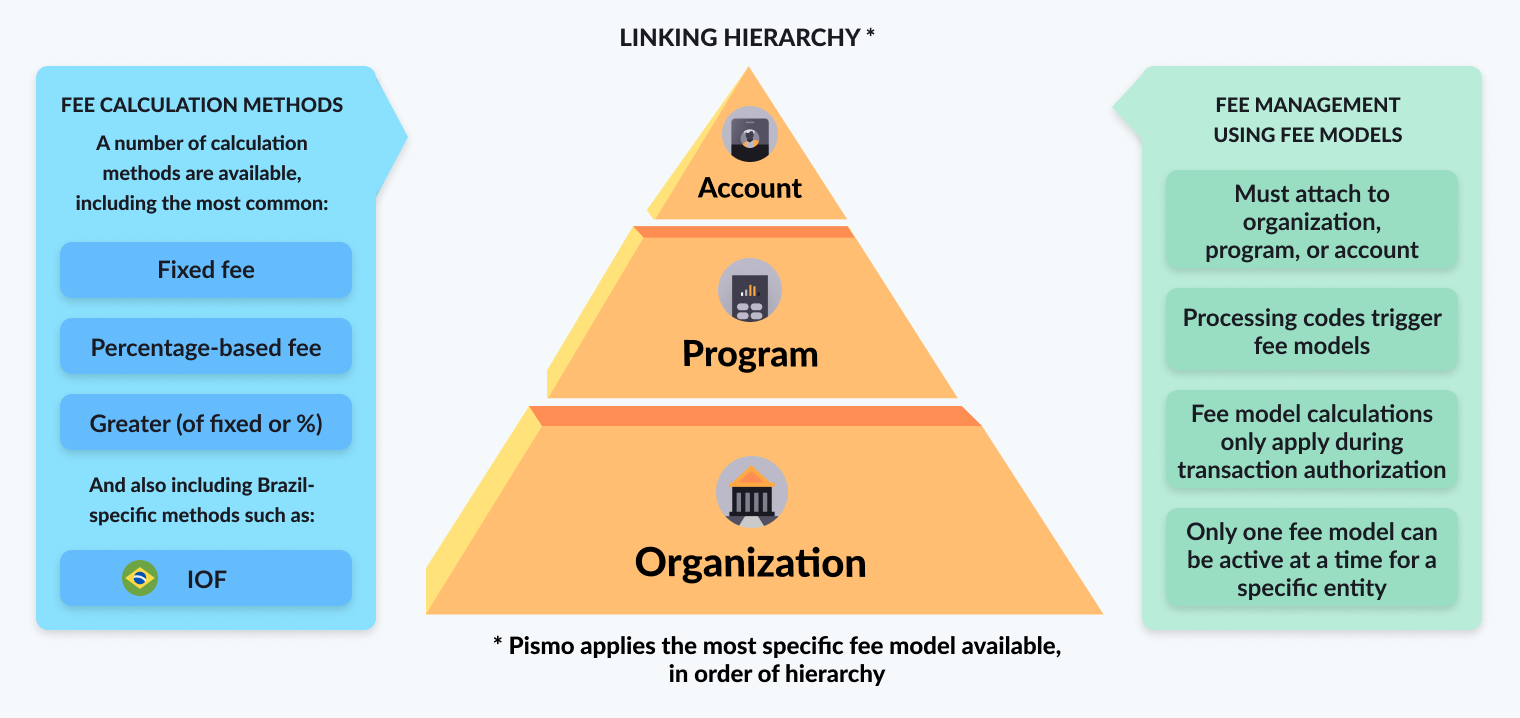
A fee model is a framework that defines a collection of fees and interest with custom calculations. It is a governed, centralized rule set for fees and taxes. It consolidates all fee policies in one place, including both the calculation logic and the conditions under which the fee is applied. You can define the method used to calculate the fee, such as a fixed value or a percentage. Fees can originate from various origins, such as local taxes or business fees applicable to specific types of transactions. The Pismo platform enables you to define all taxes, interest, and fees you need into one fee model and apply them to your operations, according to the hierarchy of account, program, or organization.
Fee models enable the flexible, centralized, and automated definition, grouping, and application of fees during transaction processing. A fee model is a mechanism that determines which fees will be charged, how they will be calculated, and to which transactions they apply.
Fee model overview
Business benefits
Centralizing fee policy into configurable models improves pricing agility and governance. Teams can introduce and adjust fees faster, apply them consistently across products and segments, and manage exceptions with clear controls—reducing operational risk while supporting revenue optimization.
This approach delivers these primary business outcomes:
- High configurability—Support a wide range of fee and tax structures to match diverse product and market needs.
- Granular control—Apply pricing policies at the organization, program, or individual account level to support segmentation and exceptions.
- Faster time-to-market—Launch, test, and adjust fees with reduced engineering dependency, enabling quicker product iteration and pricing optimization.
In addition, fee models are unique and flexible and have these key advantages:
- Temporality—Using a fee model ensures that the same fee condition will be applied on authorization and confirmation even if the fee model has changed between those events.
- Autonomy—Fee models have all configurations available through external endpoints and also through Pismo Control Center, giving you even more autonomy.
- Variety of settings—Fee models allow you to create different fees, with multiple calculation types, including options to add or deduct fees from transaction amount. You can also configure aging, amounts accumulators, and other options to support most business cases.
Rules and triggers
Each fee is defined by a calculation rule or method (what to charge) and a processing code trigger (when to charge). This separates policy from execution and supports consistent application at scale. Calculation rules specify the amount or rate and any conditional logic. Triggers define the event types that activate the fee.
Calculation rules
Fee calculations can be configured as a flat amount, a percentage of a transaction, conditional logic (for example, greater of, fixed, or percentage), and credit-specific constructs such as a daily percentage. This flexibility supports diverse product pricing strategies without custom code for each scenario.
The following are the available calculation methods. For details and examples, refer to the Creating and applying fee models guide.
- FIXED—Applies fixed amount fees to specified transactions
- PERCENTAGE—Applies a percentage fee amount to specified transactions
- GREATER—Applies a fixed or percentage fee amount to specified transactions depending on which is greater
- DAILY_PERCENTAGE—Applies a daily simple interest percentage to things like credit card cash advances and other loan type products until the next cycle closing
- COMPOUND_INTEREST—Defines when interest is compounded on loan type products
- ACCUMULATOR—Collects totals based on specified transaction types and applies a fixed or percentage fee on a scheduled basis
- DYNAMIC BY AMOUNT—Calculation strategy that allows you to apply "automatic" fees over DC accounts for situations such as withdrawal before due date
- EQUAL INSTALLMENTS—Calculates loan repayments (or installment plans) so that all installments have the same total amount throughout the life of the contract
The following methods apply to Brazil only:
- PRICE TABLE—Calculates loan repayments (installment plans) so that all installments have the same total amount throughout the life of the contract, adding some specific fee calculations including the IOF amount being financed
- AGING—Determines how fees are calculated and applied to investments over time
- IOF—Determines how Brazilian IOF taxes are calculated for investments
Triggers (processing codes)
Once you've created a fee model, use processing codes to link each fee included in the fee model to financial operations. Processing codes identify an operation, such as purchases or debits. Each financial operation within the platform has its own processing code. You can configure some processing codes, while others are fixed in the card network flow. Talk to your Pismo representative to get or create processing codes.
Processing codes act as discrete triggers. Each financial operation is represented by a unique code that can activate a fee when matched. By linking each fee from your fee model to a specific processing code, the platform applies fees with high precision—ensuring charges are assessed only for the intended transaction types and reducing disputes and reconciliation effort.
The operation must match the processing code
The fee is ignored if the operation doesn't match the defined processing codes.
Hierarchy of control
Fees are applied through a hierarchy to balance global governance with product and customer-level customization. The Pismo platform applies fee models using a three-level hierarchy, enabling standardization while supporting targeted overrides.
At the most basic level, you have the organization level. This is the big global default. It's the baseline fee model that applies to every single account across your entire business.
The next level up is the program level. Imagine you have a gold card or maybe a student account with its own unique fees. A fee model at this level overrides the global default, but only for accounts that are part of that specific product.
Finally, for the ultimate level of precision, you can go all the way down to a single account.
Override rule: The system applies exactly one fee model—the most specific model available. Account-level overrides take precedence over program-level models, which take precedence over the organization default.
Cloned programs
When you clone a program, the fee model links are not cloned automatically. You must link the applicable fee model to the cloned program.
Next steps
Now that you have a basic understanding of what fee models are and how they can help fulfill your business needs, you can start creating your own fee models. Refer to the Creating and applying fee models guide to get started.
Updated 6 months ago