
Creating and applying fee models
Use the Create fee model endpoint to create a new fee model. You can also create, define, and link fee models in Control Center. A fee model must have ALL fees and taxes that should be applied to the organization, program, or account level. A fee model is compounded by the sum of fees and each level (organization, program, or account) can have only one fee model attached. Therefore, it is important to make sure that each fee model has all fees included. Pismo will differentiate one fee from another by the processing code indicated for each fee, assuring that each fee will be correctly applied.
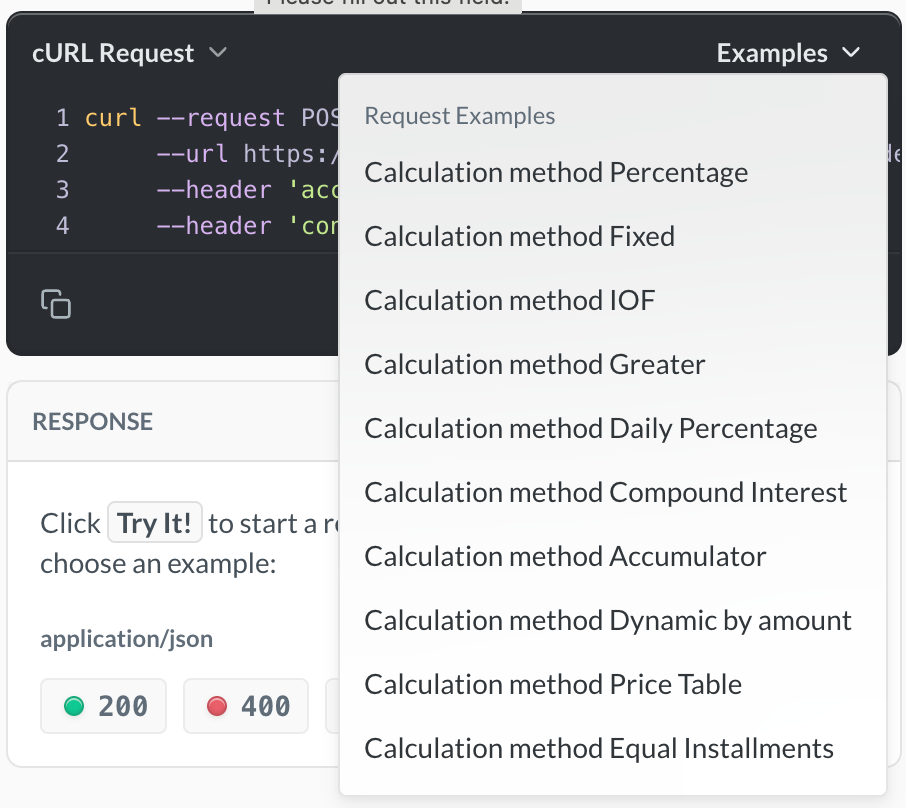
For each model, you specify an array of one or more fee objects (thefees property). This object contains (in addition to other properties) a calculation object, consisting of a calculation_methodand one or more other properties which vary depending on the calculation. The calculation_method is the method the fee model uses to calculate that particular fee.
The Pismo platform supports the following fee model calculation methods (represented by their enums):
-
FIXED—Applies fixed amount fees to specified transactions.
Example: apply 5 USD on withdrawal. -
PERCENTAGE—Applies a percentage fee amount to specified transactions.
Example: apply 1% over a value. -
GREATER—Applies a fixed or percentage fee amount to specified transactions depending on which is greater.
Example: apply 1% or 5 USD over 100 USD—5 USD will be applied. -
DAILY_PERCENTAGE—Applies a daily simple interest percentage to things like credit card cash advances and other loan type products until the next cycle closing.
Example: apply 0.0082% daily tax for 20 days (until cycle closing). -
COMPOUND_INTEREST—Defines when interest is compounded on loan type products. -
ACCUMULATOR—Collects totals based on specified transaction types and applies a fixed or percentage fee on a scheduled basis.
Note: This is a special case in that you must call the Create accumulator configuration endpoint to get an identifier for the configuration you can use when creating an accumulator fee model. -
DYNAMIC_BY_AMOUNT—Calculation strategy that allows you to apply "automatic" fees over DC accounts (deposit accounts) for situations such as withdrawal before due date. -
EQUAL_INSTALLMENTS—Calculates loan repayments (or installment plans) so that all installments have the same total amount throughout the life of the contract. This method ensures a smooth and predictable cash flow for the card holder, while accurately reflecting the financial logic of interest accrual over time. Although the installment value remains constant, its composition changes over time. The interest is higher in the first installments and gradually decreases as the outstanding balance is reduced. The principal repayment is smaller at the beginning and increases over time, compensating for the reduction in interest.
For example, given the following details:-
Principal: USD 1,000
-
Interest rate: 1% per month
-
Term: 5 months
-
Method: Equal Installments
The monthly installment calculated is USD 206.04 (total contract amount: USD 1030.02).
This would be the installment details for each of the five months:Month Amount How calculated 1 USD 206.04 Principal amount of 196.04 plus interest 10 2 USD 206.04 Principal amount of 198 plus interest 8.04 3 USD 206.04 Principal amount of 199.98 plus interest 6.06 4 USD 206.04 Principal amount of 201.98 plus interest 4.06 5 USD 206.04 Principal amount of 204 plus interest 2.0
-
PRICE_TABLE(Brazil only)—Calculates loan repayments (installment plans) so that all installments have the same total amount throughout the life of the contract, adding some specific fee calculations including the IOF amount being financed.AGING(Brazil only)—Determines how fees are calculated and applied to investments over time.IOF(Brazil only)—Determines how IOF (Brazilian tax) taxes are calculated for investments.
For details on IOF and a sample IOF fee model, refer to the IOF fee model for Brazil guide.
Apply a fee model
A new fee model is detached by default and not linked to anything. When you create a new fee model, you must link it to financial operations within an organization, program, or an account.
One fee model at a time
You can only link one fee model to an organization, program, or account at a time
You must link your fee model to an organization, program, or account based on processing codes, which identify the financial operation, such as purchases or debits. Each financial operation within the Pismo platform has its own processing code. You can configure some processing codes, while others are fixed in the card network flow. The fee is ignored if the operation doesn't match the defined processing codes.
Talk to your Pismo representative to get or create processing codes. For details on existing processing codes, refer to the Processing codes guide.
You can link a fee model at the following levels of detail:
- Organization level—Link to all accounts in your organization, regardless of which program contains the account. To link your fee model to a organization, use the Attach fee model to org endpoint. You can also do this in Control Center.
- Program level—Link to all accounts within a specific program. To link your fee model to a program, use the Attach fee model to program endpoint. You can also do this in Control Center.
- Account level—Link to selected accounts, regardless of which program they are in. To link your fee model to a specific account, use the Attach fee model to account endpoint. You cannot link fee models at the account level through Control Center, you can only do this using the endpoint.
Sample fee model payloads
You can find sample payloads for each fee model type in the Create fee model endpoint.
Updated 6 months ago