
Loan management overview
Pismo helps you manage your customers’ loans at every stage, from simulation and booking through settlement. Use this guide to understand how a loan progresses through its lifecycle and explore some practical scenarios.
Loan management lifecycle
This diagram and the sections following outline each stage in a loan’s lifecycle.
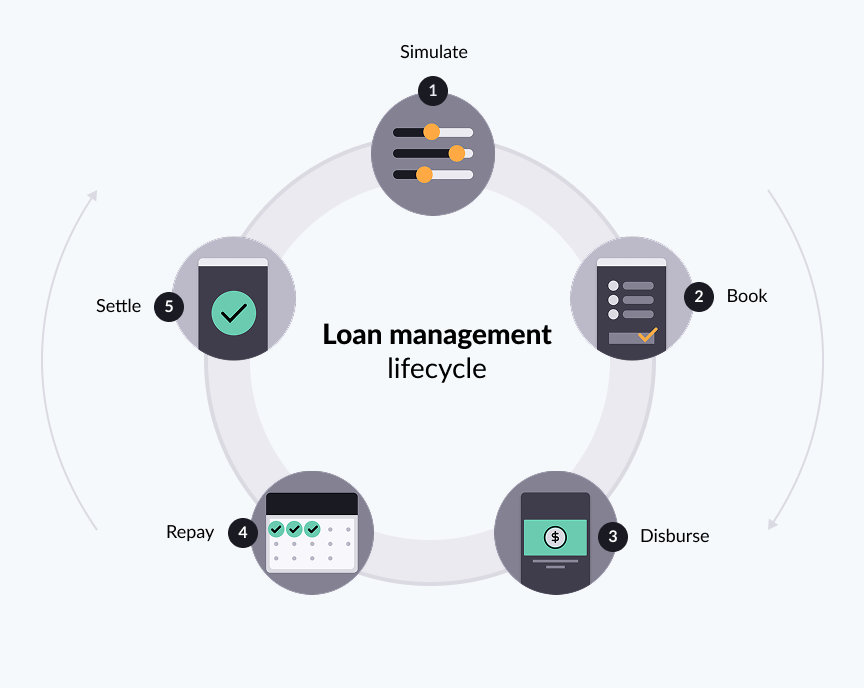
| Stage | Description | How to implement |
|---|---|---|
| Simulate | When a borrower asks for a loan, you create a simulation to show the loan terms, such as the monthly payment cost. | Simulate loans |
| Book | After the underwriter approves the loan terms and the borrower has accepted these terms, you book the simulated loan. | Book loans |
| Disburse | Send fund to the borrower's account (internal or external) and collect any service charges. | Disburse loans |
| Repay | Register the borrower's repayments, including partial payments. | Manage loan repayment and settlement |
| Settle | After the borrower repays the loan in full, Pismo auto-settles the loan. | Manage loan repayment and settlement |
| Cancel | At any time in the lifecycle, a loan cancellation can occur. | Cancel loans |
Simulate loans
Use loan simulation to preview the terms of a loan before booking it. When you create a simulation, the Pismo platform calculates a payment schedule, interest, and other terms based on the loan product configuration and the parameters you provide. This helps you and your customers understand repayment amounts, due dates, and total costs before committing to a loan.
Loan simulations are only valid for one day so they always reflect the most up-to-date rates, fees, and balances. This limit helps ensure the results you see are accurate and not based on outdated information.
When you request a simulation, the Pismo platform selects a plan using the following priority (from highest to lowest):
- Account-level settings
- Program-level settings
- Organization-level settings
The simulation system loads all available plans and tries to match them to your request. The selection process follows this order:
- If you provide specific plan IDs, the simulation system looks only for those plans. If none match, no plan is selected.
- If you provide custom filters (but no plan IDs), the simulation system looks for plans with at least one matching filter value.
- If none match, selection fails. If you provide neither plan IDs nor custom filters, the simulation system applies standard filters (such as processing codes or merchant IDs) and checks for matches.
If no plans match after applying these rules, the system returns a message indicating that no plan was selected with the provided plan IDs or filters. Your request did not match any configured simulation plans.
Book loans
During booking, you finalize the borrower’s approval and create the loan according to the agreed terms from the simulation, turning it into an active agreement the borrower can start using.
Disburse loans
When disbursing a loan, you release the approved funds to the borrower’s account according to the agreed terms, turning a booked loan into money the borrower can use.
When you set up disbursement for a loan, keep the following in mind:
- Depending on your lending rules, you can instantly disburse funds into a borrower’s account or, for Buy Now, Pay Later (BNPL) loans, into a merchant’s account. Instant disbursement lets the loan lifecycle start sooner.
- You can disburse funds either to an account registered on the Pismo platform or to an external account.
- You can disburse the loan in a single lump sum (single disbursement) or over several payments (multiple disbursement).
Repay loans
When you simulate or book a new loan, the Pismo platform generates a repayment schedule based on the settings of the associated loan product. The schedule details each repayment period, including the amount due, any fees, the due date, and the remaining balance.
Partial repayment
A partial repayment occurs when a borrower pays less than the full amount due for the current repayment period. For example, if the borrower owes $300 this month but pays only $200, that is a partial repayment.
Before the period’s due date, the borrower can make additional payments until the remaining balance for that period is zero. If they don't clear the balance by the due date, the repayment might become past due and, depending on the loan agreement, the loan can go into default. In that case, the borrower might need to make an arrears payment, which simply means catching up on a payment that is late.
Grace period
A grace period is a set number of calendar days after an installment due date during which the Pismo platform does not apply late fees or mark the repayment as delinquent.
During the grace period, the arrears counter still runs in the background, starting from the original due date. If the customer pays within the grace period, there is no impact to the customer and no late fees or penalties are charged. If the customer pays after the grace period ends, the arrears counter shows the days past due, and late fees or penalties are calculated from the due date.
The grace period is configured in the loan product.
Settle loans
If the borrower makes all payments as required, the Pismo platform automatically settles the loan. Early final settlement (EFS) occurs when a borrower repays the full amount of the loan, plus any applicable charges, before the final scheduled payment date.
Cancel loans
Canceling loans can affect two levels: the loans themselves and—when delinquency triggers the cancellation—the account.
Loan-level effects
Whether you cancel a single loan or all loans on an account, the platform does the following for each canceled loan:
- Moves the loan to the
CANCELEDstatus, expects no further repayment, and cancels all expected transfers. See Loan statuses overview. - Records a cancellation authorization that you can correlate using the
tracking_idfrom the response. - Generates a Loan updated event.
When the platform no longer expects to collect a loan's outstanding amount, that loan can also carry the WRITTEN_OFF status.
Account-level effects: delinquency closure
Beyond manual cancellation, Pismo can automatically cancel every eligible loan on an account that remains past due. Two loan product settings govern this delinquency closure flow, not the cancel endpoints:
delinquency_closure_days—the number of days past due (1–365) after which the platform closes the delinquent account.bring_to_pv_on_delinquency(defaultfalse)—whether the platform brings the outstanding schedule to present value during closure.
An account that misses its minimum amount due becomes a delinquent (non-performing) account. Its collection status progresses through the values NORMAL, OVERDUE, and CANCELED. For more information, see Account collection status.
When the account reaches the delinquency threshold, the platform:
- Cancels all eligible loans on the account and emits a Delinquent account event that lists each canceled loan and its payable installment count.
- Changes the account's collection status to
CANCELED. - Closes the account with the reason
DELINQUENCY_CLOSUREfor credit programs. This closure permanently cancels the account; you can't reopen it. For the full closure sequence, see Credit liquidation.
Loan repayment scenarios
Loan repayment behavior varies depending on the loan product and the repayment schedule generated when the loan was booked. In general, the following configurations impact repayment behavior:
- The loan amount
- The repayment due date
- If repayment is made at the beginning or end of the period
- If loan charges are paid upfront, deducted from the disbursement, or amortized over the life of the loan
- If interest is charged, and how it is repaid over the life of the loan
- If stages are used to change these configurations after a set number of periods
For more information on configuring loans and loan products, refer to Create loan products.
Example 1
The following diagram shows a zero-interest, no-charge loan with repayments at the beginning of each period. For a loan of $300 to be repaid in three months, the borrower pays three flat payments of $100 each. A payment period could represent a week, two weeks, a month, or a quarter.
Example 2
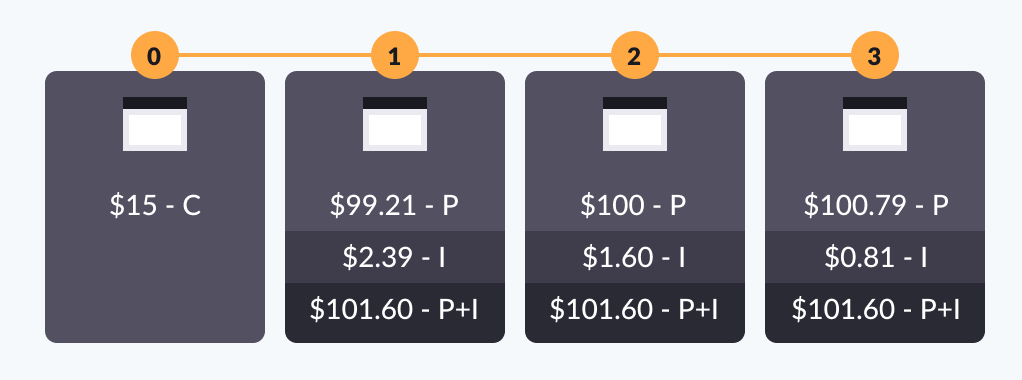
The following diagram shows a zero-interest loan with upfront charges and repayments at the end of each period. For a loan of $300 with a 5% charge to be repaid in three months, a $15 fee is charged up front at the time of booking, followed by flat payments at the end of the first three payment periods of $100 each.
Example 3
The following diagram shows a loan with charges deducted from the disbursement and interest calculated on a reducing balance basis. For a loan of $300 with a 5% charge and 10% interest per year to be repaid in three months, the repayment lifecycle includes:
- A $15 charge deducted from the disbursement
- A flat total repayment amount, where the amount of interest repaid is greatest in the first period and reduces each period after that
Example 4
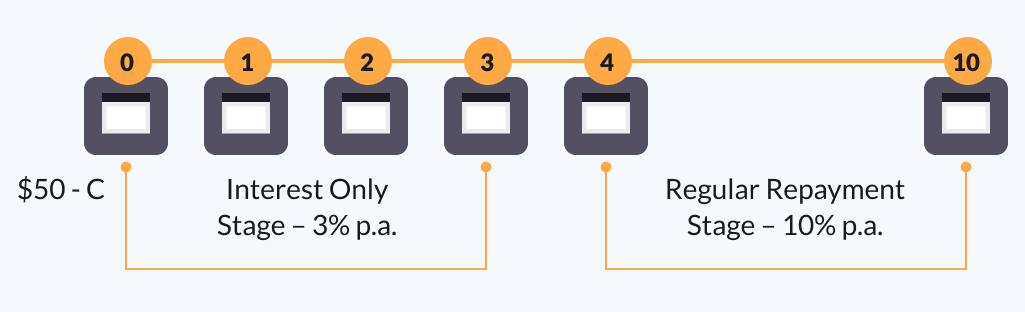
The following diagram shows a loan with multiple stages, deducted charges, and interest calculated on a reducing balance basis.
The first stage lasts three periods and only charges the borrower for an interest rate of 3% per year, represented with per annum (p.a.) in the following diagram.
The second stage lasts seven pay periods and charges the principal and interest at a rate of 10% per year. For a loan of $1000 with a 5% charge and 3% interest in the first three periods and 10% interest in the final seven periods, the repayment lifecycle includes:
- A $15 charge deducted from the disbursement
- A flat repayment of the interest only at a rate of 3% for three months
- A flat repayment of the principal and interest at a rate of 10% for seven months, where the amount of interest repaid is greatest in the fourth month (the first period of this stage) and reduces each period after that
Updated 27 days ago
What’s Next
Start to manage loans and learn more about loan statuses.