
Installment agreements
If a cardholder wishes to renegotiate only overdue debt, use an installment agreement contract.
After implementing an installment agreement, the debt due on an account redistributes across the next statements. The platform then adds a credit equal to the refinanced balance and overdue balance from other past statements. It creates installments for current and future statements. Refer to the figure below.
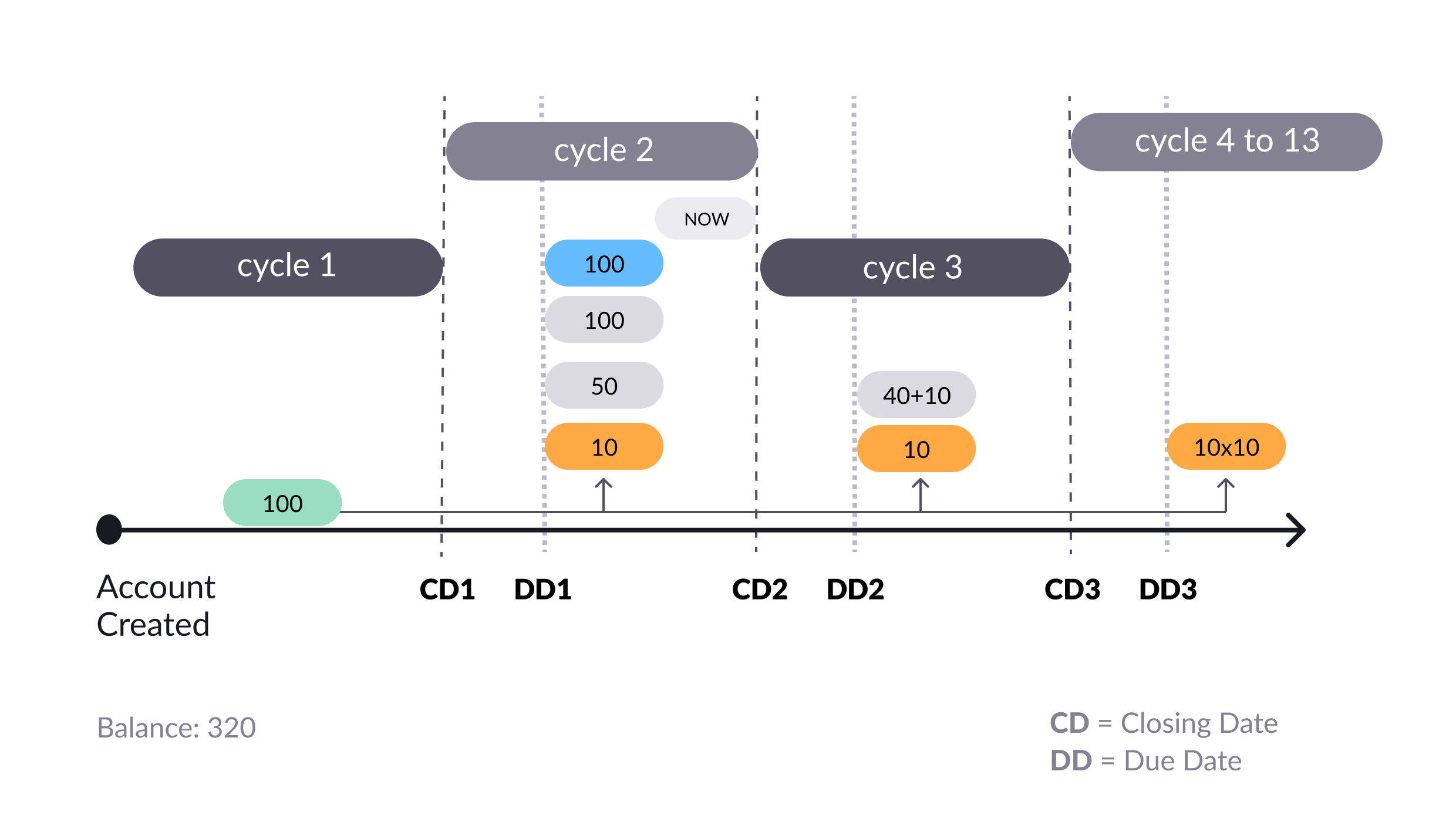
Redistributing the debt across the billing cycles (shown in orange)
After implementing the installment agreement of the 100 that was overdue in Cycle 1, the cardholder needs to make a payment of 160 in Cycle 2 to avoid becoming overdue in DD2. The cardholder also has to make a payment of 60 in DD3 in Cycle 3. To avoid becoming overdue again, the cardholder has to pay 10 in the 10 subsequent due dates.
Creating an installment agreement
Before you create a new payment agreement, make sure the customer is eligible for refinancing. So, check with your organization’s refinancing terms, procedures, and conditions (for example, debt-to-income or credit history).
If the customer is eligible for refinancing:
- Get their account details using the Get account endpoint.
- Copy the number from the
current_cyclefield in the response. - Execute the List statements v3 endpoint, entering the number from Step 2 into the
startCyclefield. - Get the refinanced amount from the
previous_balancefield in the response. - Use your own calculation method based on the refinanced amount to generate a new payment plan.
Since the Pismo platform supports a collection of installments, you can use any desired amortization system to calculate a payment agreement.
-
After you have the plan, use Create payment agreement to create a new installment agreement.
-
In this endpoint, set the following fields to
false.statement_agreementcompulsorysettle_accural
-
Use the
installmentbody parameter to create installments for the payment agreement. -
Populate the remaining fields. Note that IOF fields only apply to Brazil. If you’re not in Brazil, enter 0 in the IOF fields.
-
Execute the endpoint.
Once you’ve created a new installment agreement, the Pismo platform posts the new installments on the currently open and future statements. If the customer needs to cancel the agreement, use Cancel payment agreement.
Manage installment agreements
Use the other endpoints in the Refinancing API to search for and manage your installment agreements (as well as other types of payment agreements).
Updated 7 months ago