
Access Pismo Postman collections
Use the Pismo Developers Postman page to find collections and workspaces to test Pismo APIs. The Pismo workspace has these collections:
- All Pismo API collection
- Pismo card collection
Prerequisites
- Work with your Pismo representative to set up your organization. You can use Pismo Control Center to do a lot of this setup through a convenient UI.
- Ensure you have some basic data in your organization such as a program configured that enables due dates. Refer to Core objects for more information and to get started.
- Ensure you have generated access keys using Control Center and saved both the server key and server secret in a safe place for authentication.
- Make sure you have the Pismo sandbox environment as the current environment and have updated the environment variables as needed.
- You must use a credit program to use the Pismo card collection. Some endpoints only work with programs that allow those configurations. For example, if the program does not allow cash-in transfers, the "Make a Cash-In transfer" request in this collection does not work with that program ID. Also, note that debit card programs do not require due dates, so
DEBITOtype programs do not work with this Pismo card collection.
Fork Pismo Postman collections
The recommended way to work with a collection and environment is to fork them. This is similar to forking in GitHub. Forking enables you to pull in Pismo’s changes to the collection and environment over time.
IMPORTANT: To keep your credentials, tokens, and sensitive data private, always fork into a private workspace.
-
Use the Run in Postman links in the table to access and fork the Pismo Postman collections in the Pismo workspace.
When creating your fork, select the Watch original collection box to enable Postman to send you emails when Pismo updates the collection so you can pull the changes into your fork and always stay up to date with the latest version of the collections. The following table contains links to fork a collection into a sandbox environment which is used for all collections.
| Collection Name | Fork link |
|---|---|
| All public Pismo endpoints | |
| Pismo cards collection |
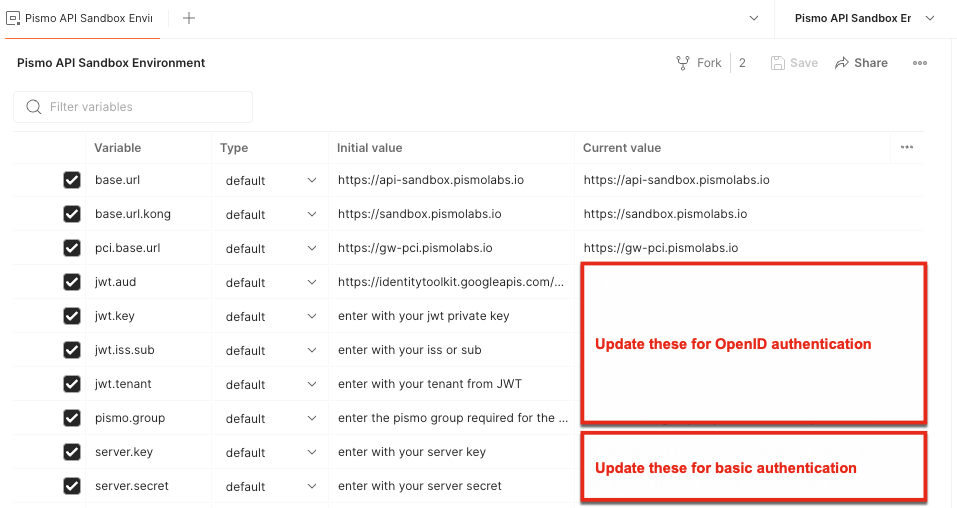
- Set up your environment variables in Postman. You must update the variables for your Pismo key and authenticate before any calls will work. All endpoints can use a variable for the URL.
When using OpenID authentication, update the pismo.group variable in the sandbox environment based on the endpoints you are testing. For more information on how to authenticate with OpenID, refer to Authenticate with OpenID.
Next steps
With access to Postman collections, you have multiple options for trying API endpoints with a few different use cases:
- Mock up test data with real requests and responses using sandbox infrastructure.
- Create end-to-end workflow recipes to demonstrate and understand using multiple endpoints for a complete workflow.
- Build integration tests with Postman collections.
Updated 3 months ago