
Installment advancements
An installment advancement is a way to settle future debt in the current cycle, rather than in a future cycle. Essentially, it’s a cash flow management feature.
The following figure illustrates advancing a single installment. In this example, the interest that would have been applied to the installment if it had not been advanced is removed (that is, not applied).
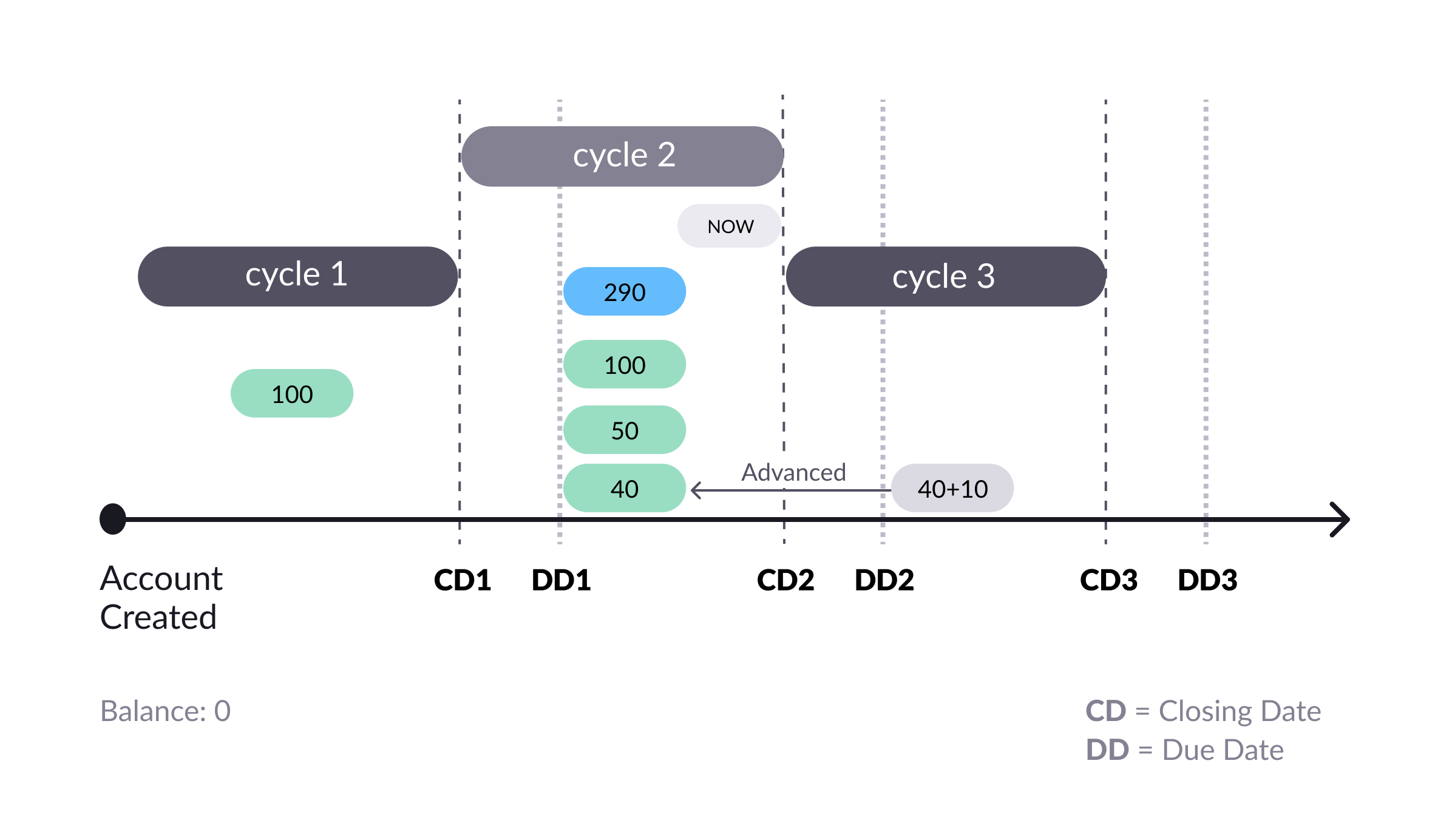
Settling a debt in full in the current billing cycle (shown in blue)
In Cycle 2, the cardholder advanced the future transaction into the present. By doing this, they excluded the transaction’s interest charges of 10. So now, they can pay their debt in full with a payment of 290. If they hadn't done an installment advancement, the amount paid to settle all debt would have been 300.
Advancing installments
You can advance one or more future installments in a single operation called an installment advancement. An installment advancement can specify a specific number of future installments to advance in a specific installment agreement. Or it can advance all future installments in all installment agreements associated with the account. (If a customer might do this is they wanted to pay off their entire debt at once.)
The Pismo platform advances installments starting with the last future installment in the series and working down from there. For example, suppose you are currently in cycle 1, and you have a series of installments scheduled for cycles 2, 3, 4, and 5. Now suppose you create an installment advancement and set the number of installments to advance to 2. The result is that the platform advances installments from cycles 4 and 5 to cycle 1. It does not advance installments for cycles 2 or 3.
The Pismo platform provides several APIs for managing installment advancements. Click on the links for details.
- Simulating an installment advancement
- Creating an installment advancement
- Retrieving an installment advancement
- Canceling an installment advancement
Simulating an installment advancement
The Simulate installment advancement endpoint lets you simulate an advancement without actually creating it.
To simulate advancing installments for all the installment agreements (contracts) associated with an account, set the condition query parameter to ALL_CONTRACTS. To simulate advancing installments for a single installment agreement, set the condition query parameter to SINGLE_CONTRACT, and set the transaction_id query parameter to the transaction ID of any one of the installments in the agreement.
When you simulate advancing an installment, you must specify what to do with the interest for that installment. For more information, refer to Handling interest on advanced installments.
Example
Execute the following request to simulate advancing all the installments in each of the installment agreements associated with an account whose ID is 169528212. Since removeInterestFromCurrent is false and calculator is NONE, the interest for each advanced installment is moved with the installment.
curl --request GET \
     --url 'https://sandbox.pismolabs.io/installment-management/v1/accounts/6912345/installment-advance/simulations?transactionId=98457355&condition=ALL_CONTRACTS&removeInterestFromCurrent=false&calculator=NONE&reschedule=ADVANCEMENT' \
     --header 'accept: application/json'
If the request executes successfully, it should produce a result similar to the following.
{
    "account_id": 169528212,
    "condition": "ALL_CONTRACTS",
    "calculator": "NONE",
    "reschedule": "ADVANCEMENT",
    "installments": [
        {
            "id": 2862814643,
            "old_statement_id": 1391523222,
            "new_statement_id": 1391523222,
            "old_amount": 55.00,
            "new_amount": 55.00,
            "old_interest_amount": 5.00,
            "new_interest_amount": 5.00
        },
        {
            "id": 2862814645,
            "old_statement_id": 1391523223,
            "new_statement_id": 1391523222,
            "old_amount": 55.00,
            "new_amount": 55.00,
            "old_interest_amount": 5.00,
            "new_interest_amount": 5.00
        },
        {
            "id": 2862814647,
            "old_statement_id": 1391523224,
            "new_statement_id": 1391523222,
            "old_amount": 55.00,
            "new_amount": 55.00,
            "old_interest_amount": 5.00,
            "new_interest_amount": 5.00
        },
        {
            "id": 2862814649,
            "old_statement_id": 1391523225,
            "new_statement_id": 1391523222,
            "old_amount": 55.00,
            "new_amount": 55.00,
            "old_interest_amount": 5.00,
            "new_interest_amount": 5.00
        },
        {
            "id": 2862814642,
            "old_statement_id": 1391523222,
            "new_statement_id": 1391523222,
            "old_amount": 5.00,
            "new_amount": 5.00
        },
        {
            "id": 2862814644,
            "old_statement_id": 1391523223,
            "new_statement_id": 1391523222,
            "old_amount": 5.00,
            "new_amount": 5.00
        },
        {
            "id": 2862814646,
            "old_statement_id": 1391523224,
            "new_statement_id": 1391523222,
            "old_amount": 5.00,
            "new_amount": 5.00
        },
        {
            "id": 2862814648,
            "old_statement_id": 1391523225,
            "new_statement_id": 1391523222,
            "old_amount": 5.00,
            "new_amount": 5.00
        }
    ]
}
Creating an installment advancement
Use the Create installment advancement endpoint to advance one or more installments to the current cycle.
To advance installments for all the installment agreements (contracts) associated with an account, set the condition query parameter to ALL_CONTRACTS. To advance installments for a single installment agreement, set the condition query parameter to SINGLE_CONTRACT, and set the transaction_id query parameter to the transaction ID of any one of the installments in the agreement.
When you advance an installment, you must specify what to do with the interest for that installment. For more information, refer to Handling interest on advanced installments.
Example
Execute the following request to advance all installments in each of the installment agreements associated with an account whose ID is 169528212. Since remove_interest_from_current is false and calculator is PRESENT_VALUE, the interest on each advanced installment is not removed, but it is recalculated.
POST v1/accounts/{{account_id}}/installment-advance

curl --request POST \
     --url https://sandbox.pismolabs.io/installment-management/v1/accounts/169528212/installment-advance \
     --header 'accept: application/json' \
     --header 'content-type: application/json' \
     --header 'x-cid: 5bb05174-4e80-11ea-b77f-2e728ce88125' \
     --data '
{
  "remove_interest_from_current": false,
  "condition": "ALL_CONTRACTS",
  "calculator": "PRESENT_VALUE",
  "reschedule": "ADVANCEMENT"
}
If the request executes successfully, it should produce a result similar to that shown below. Note that several of the installments have had their interest reduced. These are the installments that were advanced. The installments that show the same values for old_interest_amount and new_interest_amount were already in the current cycle, so they weren't moved.
Normally, there would be one installment scheduled per cycle. However, installments can be manipulated by other services, such as transaction shifts, so there could be more than one installment already in the current cycle before the advancement request. That's the case in this example.
{
    "advancement_id": 84,
    "account_id": 169528212,
    "org_id": "TN-cc8f8b89-233a-4582-9f36-63ee85278d6d",
    "condition": "ALL_CONTRACTS",
    "calculator": "PRESENT_VALUE",
    "reschedule": "ADVANCEMENT",
    "created_at": "2024-04-22T12:02:43",
    "installments": [
        {
            "id": 2862814643,
            "old_statement_id": 1391523222,
            "new_statement_id": 1391523222,
            "old_amount": 55.00,
            "new_amount": 55.00,
            "old_interest_amount": 5.00,
            "new_interest_amount": 5.00
        },
        {
            "id": 2862814645,
            "old_statement_id": 1391523223,
            "new_statement_id": 1391523222,
            "old_amount": 55.00,
            "new_amount": 54.53,
            "old_interest_amount": 5.00,
            "new_interest_amount": 4.53
        },
        {
            "id": 2862814647,
            "old_statement_id": 1391523224,
            "new_statement_id": 1391523222,
            "old_amount": 55.00,
            "new_amount": 54.12,
            "old_interest_amount": 5.00,
            "new_interest_amount": 4.12
        },
        {
            "id": 2862814649,
            "old_statement_id": 1391523225,
            "new_statement_id": 1391523222,
            "old_amount": 55.00,
            "new_amount": 53.73,
            "old_interest_amount": 5.00,
            "new_interest_amount": 3.73
        },
        {
            "id": 2862814642,
            "old_statement_id": 1391523222,
            "new_statement_id": 1391523222,
            "old_amount": 5.00,
            "new_amount": 5.00
        },
        {
            "id": 2862814644,
            "old_statement_id": 1391523223,
            "new_statement_id": 1391523222,
            "old_amount": 5.00,
            "new_amount": 5.00
        },
        {
            "id": 2862814646,
            "old_statement_id": 1391523224,
            "new_statement_id": 1391523222,
            "old_amount": 5.00,
            "new_amount": 5.00
        },
        {
            "id": 2862814648,
            "old_statement_id": 1391523225,
            "new_statement_id": 1391523222,
            "old_amount": 5.00,
            "new_amount": 5.00
        }
    ]
}
When calculator is PRESENT_VALUE, the old_amount and new_amount fields of the response body represent the total installment amount, including principal and charges. When a client advances two or more installments, the recalculated value (new_amount) differs for each installment. This is because the adjustment is based on the Present Value formula, which uses the number of days between the current cycle and the installment cycle to determine the updated installment value.
Present Value formula:
New_amount = OA / (1 + IR/100)^(NDA/30) where:
OA = Old Amount
IR = Interest rate
NDA = Number of days to advance
To give an example, suppose you have the following values.
OA = 240.13
IR = 12.8%
NDA = 30 days
Plugging these into the formula, you get:
240.13 / (1 + 12.8/100)^(30/30) = 212.86
So, if the installment is advanced by 30 days, the new installment value is 212.86.
The new_interest_amount field is calculated as follows:
new_interest_amount = new_amount × interest rate
So, new_interest_amount = 212.86 × 12.8% = ~27.25 (Note that this is an estimate.)
On the other hand, suppose you set NDA to 60 days:
OA = 240.13
IR = 12.8%
NDA = 60 days
Now, the formula gives you:
240.13 / (1 + 12.8/100)^(60/30) = 188.91
So, if the installment is advanced by 60 days, the new installment value is 188.91.
new_interest_amount = 188.91 × 12.8% = ~24.18
Handling interest on advanced installments
When you advance an installment to the current cycle using the Create installment advancement endpoint, or simulate such an advancement using the Simulate installment advancement endpoint, you must specify what to do with the interest for that installment.
There are three possibilities:
- To remove 100% of the interest on the advanced installment(s), set the
remove_interest_from_currentfield totrueand thecalculatorfield toREMOVE_ALL_INTEREST. - To advance 100% of the interest on the advanced installment(s), set
remove_interest_from_currenttofalseand setcalculatortoNONE. - To recalculate the interest applied to the advanced installment(s), set
calculatortoPRESENT_VALUE. This tells the Pismo platform to recalculate the interest on an advanced installment based on the difference between the original statement due date and the due date of the current statement. To do this, it uses the Present Value formula:
New_amount = OA / (1 + IR/100)^(NDA/30) where:
OA = Old Amount
IR = Interest rate
NDA = Number of days to advance. (Installments are advanced from the last cycle, so the NDA is determined by how far in the future the cycle of the installment being advanced is.)
remove_interest_from_currentcan be set to eithertrueorfalse. Iftrue, then the interest on installments that were already in the current cycle (and did not need to be advanced) is recalculated based on the date of the advancement. Iffalse, the interest on those installments is unchanged.
Retrieving an installment advancement
Use the Get installment advancement endpoint to retrieve an existing advancement.
Example
Executing the following request retrieves an installment advancement with ID 8191125.
curl --request GET \
     --url https://sandbox.pismolabs.io/installment-management/v1/accounts/6912345/installment-advance/8191125 \
     --header 'accept: application/json' \
     --header 'x-cid: 5bb05174-4e80-11ea-b77f-2e728ce88125'
If the request executes successfully, it should return something similar to the following. In this case, the advancement is only advancing one installment.
{
  "tracking_id": "string",
  "created_at": "2021-04-14T12:00:00-03:00",
  "cancelled_at": "2021-04-14T12:00:00-03:00",
  "accountId": 67854328,
  "condition": "SINGLE_CONTRACT",
  "calculator": "PRESENT_VALUE",
  "reschedule": "ADVANCEMENT",
  "installments": [
    {
      "new_interest_amount": 9.9,
      "old_interest_amount": 11.9,
      "new_amount": 99.9,
      "old_amount": 102.9,
      "new_statement_id": 1,
      "old_statement_id": 10
    }
  ]
}
Canceling an installment advancement
Use the Cancel installment advancement endpoint to cancel an existing advancement, reverting the installments to their original due dates. The original interest charges are reinstated.
Restrictions
You can only cancel an installment advancement if:
- The
statusof the installment advancement isPROCESSED. - The discharge process for the installment has not been executed.
- The cycle closing for the advanced installment has not yet occurred.
Example
Executing the following request cancels the installment advancement that was created in the example for the Creating an installment advancement section.
curl --request DELETE \
     --url https://sandbox.pismolabs.io/installment-management/v1/accounts/169528212/installment-advance/84 \
     --header 'accept: application/json' \
     --header 'x-cid: 5bb05174-4e80-11ea-b77f-2e728ce88125'
If the request executes successfully, the results should list the installments with their amounts and interests reset to their original values.
{
    "advancement_id": 84,
    "account_id": 169528212,
    "org_id": "TN-cc8f8b89-233a-4582-9f36-63ee85278d6d",
    "condition": "ALL_CONTRACTS",
    "calculator": "PRESENT_VALUE",
    "reschedule": "ADVANCEMENT",
    "cancelled_at": "2024-04-22T12:08:59.578668977",
    "created_at": "2024-04-22T12:02:43",
    "installments": [
        {
            "id": 2862814643,
            "old_statement_id": 1391523222,
            "new_statement_id": 1391523222,
            "old_amount": 55.0,
            "new_amount": 55.0,
            "old_interest_amount": 5.0,
            "new_interest_amount": 5.0
        },
        {
            "id": 2862814645,
            "old_statement_id": 1391523222,
            "new_statement_id": 1391523223,
            "old_amount": 54.53,
            "new_amount": 55.00,
            "old_interest_amount": 4.53,
            "new_interest_amount": 5.0
        },
        {
            "id": 2862814647,
            "old_statement_id": 1391523222,
            "new_statement_id": 1391523224,
            "old_amount": 54.12,
            "new_amount": 55.00,
            "old_interest_amount": 4.12,
            "new_interest_amount": 5.0
        },
        {
            "id": 2862814649,
            "old_statement_id": 1391523222,
            "new_statement_id": 1391523225,
            "old_amount": 53.73,
            "new_amount": 55.00,
            "old_interest_amount": 3.73,
            "new_interest_amount": 5.0
        },
        {
            "id": 2862814642,
            "old_statement_id": 1391523222,
            "new_statement_id": 1391523222,
            "old_amount": 5.0,
            "new_amount": 5.0
        },
        {
            "id": 2862814644,
            "old_statement_id": 1391523222,
            "new_statement_id": 1391523223,
            "old_amount": 5.0,
            "new_amount": 5.0
        },
        {
            "id": 2862814646,
            "old_statement_id": 1391523222,
            "new_statement_id": 1391523224,
            "old_amount": 5.0,
            "new_amount": 5.0
        },
        {
            "id": 2862814648,
            "old_statement_id": 1391523222,
            "new_statement_id": 1391523225,
            "old_amount": 5.0,
            "new_amount": 5.0
        }
    ]
}
Updated about 1 month ago