
How merchant settlements and installments are processed
Transaction settlement is the process of moving funds from the cardholder’s account to the merchant’s account after the cardholder makes a credit or debit purchase.
Settlement occurs on the configured settlement date, ensuring that the amount transferred matches what the merchant expects to receive. Although you cannot configure settlement schedules, you can configure the payment schedule rules that determine how many days after a sale a transaction becomes eligible for settlement. For more information, refer to the note in the Settlement scenarios section.
The Pismo platform settles merchant transactions daily according to settlement schedules. Consult with your Pismo representative to choose an appropriate settlement batch time to run settlements based on your timezone and business needs. For example, if you want to settle all the transactions scheduled for the previous day just after midnight, and your timezone is GMT-3, a suitable time would be 03:00 or 04:00 GMT. This gives you some margin for adjustments or updates to the schedule when needed.
The Merchant transaction settled event provides the final settlement date and the net amount to be transferred to the merchant for that day. The platform generates one event for each merchant who has an amount to be settled on that day.
The following scenarios illustrate timeline examples with different settlement stages, including examples of regular sales and examples of sales that include cancellation and negative balances. In these illustrations, you learn how different transactions that occur and settle at different points in time affect final settlement outcomes.
Settlement scenarios
The example scenarios in this section use the following acronyms for settlement schedules.
D0: Payment scheduled to be settled on the same day as the sale
D1: Payment scheduled to be settled one day after the sale
D2: Payment scheduled to be settled two days after the sale
Dn: Payment scheduled to be settled n days after the sale
Because settlement runs once per day, any D0 (Day zero) sale that occurs after the daily settlement batch will settle in the next settlement batch operation.
Notes
- You can configure conditions to settle the sales amount to merchants and also the fees applicable on this amount, so that the settlement for the merchant occurs within any range of days after the sale. Specify this range by providing values for
first_installment_days_to_paymentandn_installment_days_to_paymentin the Create creditor operation endpoint.- You can override
first_installment_days_to_paymentby specifying a fixed date for the first payment. For more information, refer to Overriding the scheduled payment date.- In the following scenarios, the scheduled settlement is set to occur at 07:00 GMT every day.
Scheduled settlement
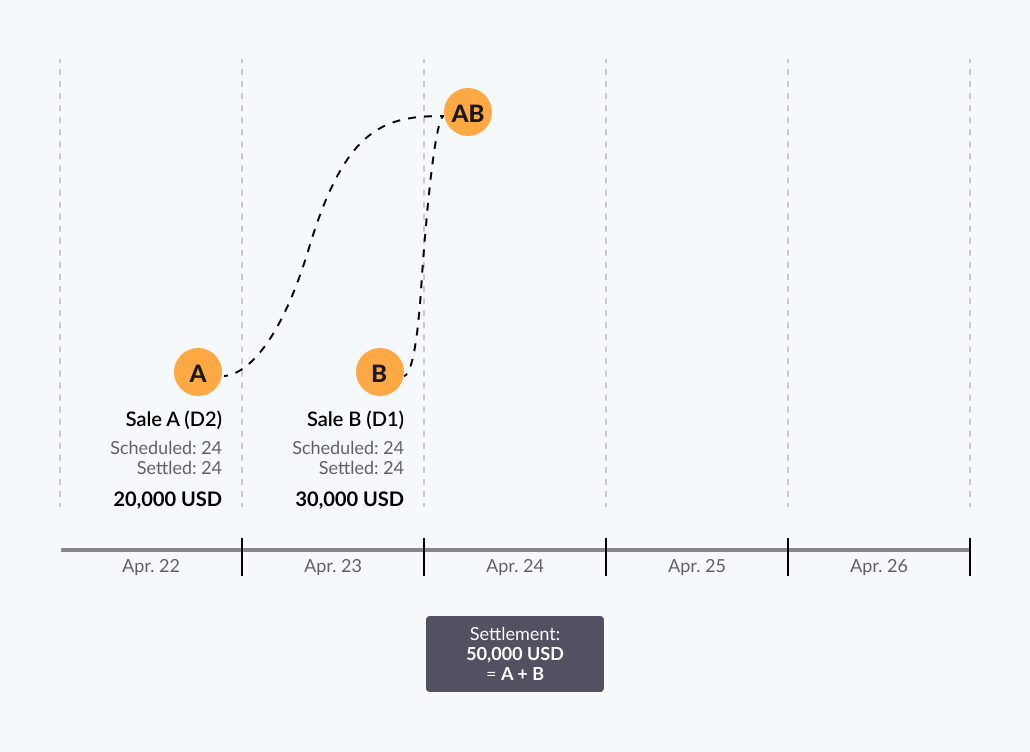
- Sale A (USD 20,000) takes place on April 22nd, and Sale B on the 23rd (USD 30,000), both are scheduled to settle in the morning of April 24th.
- On April 24th, the merchant receives a total settlement amount of USD 50,000.
Scheduled settlements and same-day settlements
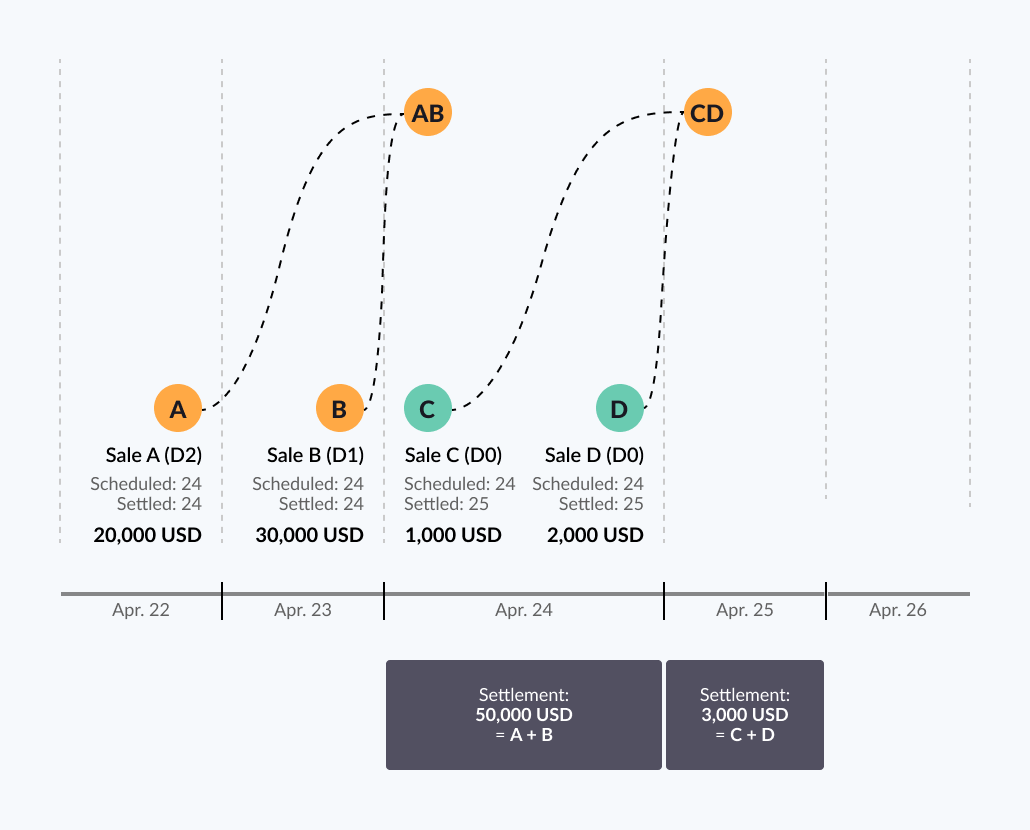
In this scenario, the following takes place:
- Sale A (USD 20,000) occurs on April 22nd, and the payment is scheduled to settle on the 24th.
- Sale B (USD 30,000) takes place on April 23rd, and the payment is scheduled for the 24th.
- Sale C (USD 1,000) occurs on April 24th, and the payment is scheduled for the 25th.
- Sale D (USD 2,000) takes place on the 24th, and the payment is scheduled for the 25th.
- Therefore, on April 24th, the merchant receives the settlement amount of USD 50,000 (Sale A + B) and receives USD 3,000 (Sale C + D) on April 25th.
Note: Although Sales C and D are D0 (eligible for same‑day settlement), they occurred after the daily settlement batch had already run. As a result, they settle the next day, which is the 25th.
Scheduled and same-day settlements plus cancellation
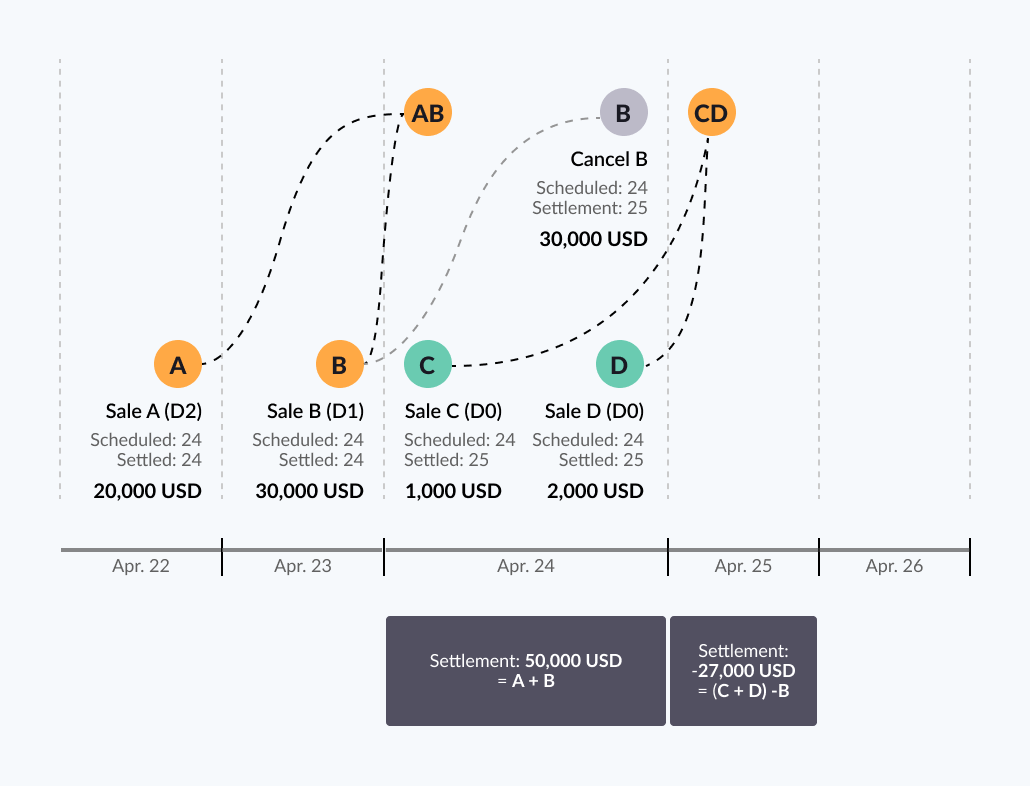
In this scenario, a cancellation is added to the settlement process:
- Sale A (USD 20,000) occurs on April 22nd and is scheduled to settle on the 24th.
- Sale B (USD 30,000) takes place on the 23rd and is also scheduled to settle on the 24th.
- Sale C (USD 1,000) happens on the 24th and is scheduled to settle on the 25th.
- Sale D (USD 2,000) occurs on the 24th and is scheduled to settle on the 25th.
- Therefore, the total settlement amount for April 24th is USD 50,000 (Sale A + B).
- However, a cancellation of USD 30,000 takes place on the 24th and is scheduled to settle on the 25th; therefore, the final settlement amount is USD -27,000 on April 25th. This negative settlement amount is carried forward as a balance owed by the merchant.
Negative balance
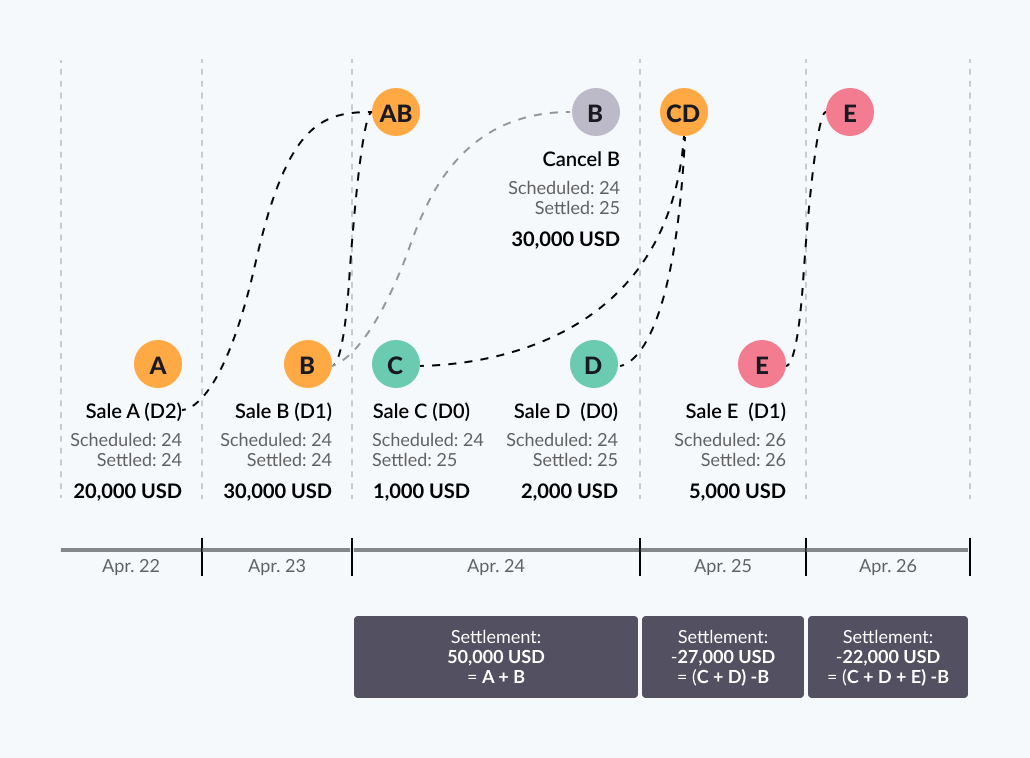
This scenario becomes even more complex when there is a negative balance involved. In this scenario:
- Sale A (USD 20,000) occurs on April 22nd and is scheduled to settle on the 24th.
- Sale B (USD 30,000) takes place on the 23rd and is also scheduled to settle on the 24th.
- Sale C (USD 1,000) happens on the 24th and is scheduled to settle on the 25th.
- Sale D (USD 2,000) occurs on the 24th and is scheduled to settle on the 25th.
- Therefore, on the 24th, the amount that is settled is USD 50,000.
- However, on April 24th, a cancellation of Sale B takes place and is scheduled to settle on the 25th.
- On the 25th, the merchant has a negative settlement amount of USD -27,000 (Sale (C + D) - B).
- On April 25th, Sale E (USD 5,000) occurs and is scheduled to settle on the 26th; as a result, the merchant’s balance becomes USD -22,000. Because the balance is still negative, the amount from Sale E is applied to reduce the negative balance rather than transferred to the merchant.
Merchant transaction settled event
As illustrated in the preceding scenarios, one of the complexities is reconciling settlement values. To accurately identify payment dates and the amount that the merchant expects to receive, the Pismo platform generates a Merchant transaction settled event, which contains up-to-date information to help you reconcile and understand what the merchant can expect to receive on the settlement date. For example, to identify the settlement amount, use the value in settlement_amount. To find the settlement date for a transaction, use the settlement_date value.
Overriding the scheduled payment date
You can override the previously configured first_installment_days_to_payment field in Create creditor operation by providing a fixed date for the first payment. To do this, use the Request authorization endpoint to send a minimum_settlement_date in the metadata object. The following sample payload illustrates this.
{
	"mti": "0100",
	"merchant": {
		"id": "mc-12345",
		"name": "Acme Used Books",
		"city": "San Diego",
		"country": "USA",
		"category_code": "5099",
		"marketplace_id": "mkt-1234"
	},
	"amount": 10,
	"currency": "986",
	"network": "Mastercard",
	"account_id": 123456789,
	"authorization_mode": "CREDIT",
	"entry_mode": "05",
	"clearing_type": "ONLINE",
	"processing_code": "P01001",
	"number_of_installments": 2,
	"metadata": {
		"minimum_settlement_date": "2024-07-22"
	}
}
As an example of how this feature might be used, suppose you have a marketplace campaign that extends between 15 July 2024 and 21 July 2024. When scheduling the settlement for these purchases, the merchants require that the first payment occur on 22 July 2024 instead of following the default 10‑day schedule. To implement this, use the above endpoint with minimum_settlement_date set to "2024-07-22".
Installment plans
The Pismo platform creates the retailer installment plan (interest-free installments) at the time of purchase confirmation. It divides the total amount into several debit transactions, each representing a separate installment.
The platform also creates a contract transaction used solely for internal bookkeeping. This entry is not shown on the customer invoice.
Recalculation on the second installment
After creating the plan, the platform divides the total purchase amount by the number of installments. It calculates the amount of each installment at the time of authorization, taking into account possible rounding. For example, for a purchase of R$100.00 in 3 installments, the first installment could be R$33.34 and the remaining installments R$33.33, to ensure the total amount is distributed correctly.
The installment amounts do not change after authorization. Each installment remains fixed unless the purchase is canceled or prepaid. The amount of each installment is already set at the time of purchase and remains fixed until the end of the plan, except in cases of cancellation or advance payment.
Recurring decimal breaks
When the total purchase amount is not evenly divisible by the number of installments, a recurring decimal break occurs. In this case, the system rounds up the first installment to ensure that the sum of the installments equals the total purchase amount. For example, on a purchase of R$ 100.00 in 3 installments:
1st installment: R$ 33.34
2nd installment: R$ 33.33
3rd installment: R$ 33.33
The platform makes this adjustment automatically, with no impact on the customer or the retailer.
Updated about 7 hours ago